Men's Chronograph Watch Troubleshooting
Men's chronograph watch troubleshooting identifies whether a symptom belongs to the chronograph function or to normal timekeeping. A chronograph function is the stopwatch mechanism that measures elapsed time while the watch continues to show the current time; Seiko defines the function this way in its 8R46 and 8R48 instructions. Its diagnostic parts include the pushers, subdials, chronograph hands and reset position. A fault limited to those parts is therefore different from a fault affecting the main time display.
Its diagnostic parts include the pushers, subdials, chronograph hands and reset position.
A men's chronograph watch that does not start, stop or reset should first be classified by the affected function and its observable operating condition. Seiko specifies that the 8R46 and 8R48 chronographs require the centre stopwatch hand to be at the zero position before use and that the stopwatch cannot operate when the indicated power reserve is below 10 hours; this is a model-specific threshold rather than a rule for every chronograph. For a quartz movement, battery condition is a separate diagnostic factor, while pusher response, hand position and whether the main time display still runs help define the symptom before repair is considered. The likely cause and repair limits therefore remain conditional on movement type, battery or stored-power state, moisture exposure, case condition and prior service.
Water exposure requires a stricter safety boundary because water resistance can deteriorate when seals, gaskets or case components are compromised.
Water exposure requires a stricter safety boundary because water resistance can deteriorate when seals, gaskets or case components are compromised. Seiko states that persistent condensation or water droplets inside a watch indicate deteriorated water-resistant performance and advises professional inspection; Seiko also notes that gasket deterioration and corrosion can reduce water resistance. If the case remains dry and undamaged, diagnosis can proceed with external checks of the pushers, subdials, main hands and reset behaviour, but visible moisture, case damage or an unresolved control fault should move the watch from home diagnosis to professional inspection rather than an assumed repair.
Table of Contents
Chronograph faults versus normal watch time faults
Chronograph faults affect the stopwatch mechanism, including the pushers, subdials, chronograph hands, reset position or elapsed-time function, while normal watch time faults affect the main time display and its main hands. Citizen Watch separates normal time indication from chronograph measurement in its B620 instructions and states that the current time remains displayed while the chronograph operates. The diagnostic distinction is therefore the affected function: a stopwatch-only symptom is a chronograph fault, while stopped or incorrect main time indication is a normal watch time fault.
These visible conditions separate control or battery-state cues from failure of the main time display.
Chronograph faults versus normal watch time faults can be distinguished by checking the crown position, pusher response, reset position, battery state and movement type before assigning a cause. Citizen Watch specifies for movement B620 that the crown must be fully pushed in for chronograph use, the upper-right pusher starts or stops measurement, and the lower-right pusher resets it; the same movement measures up to 59 minutes 59.8 seconds and disables chronograph operation when the main seconds hand moves once every 2 seconds as the insufficient-charge warning. These visible conditions separate control or battery-state cues from failure of the main time display. The image below clarifies this distinction, while chronograph functions and buttons explains the controls themselves.
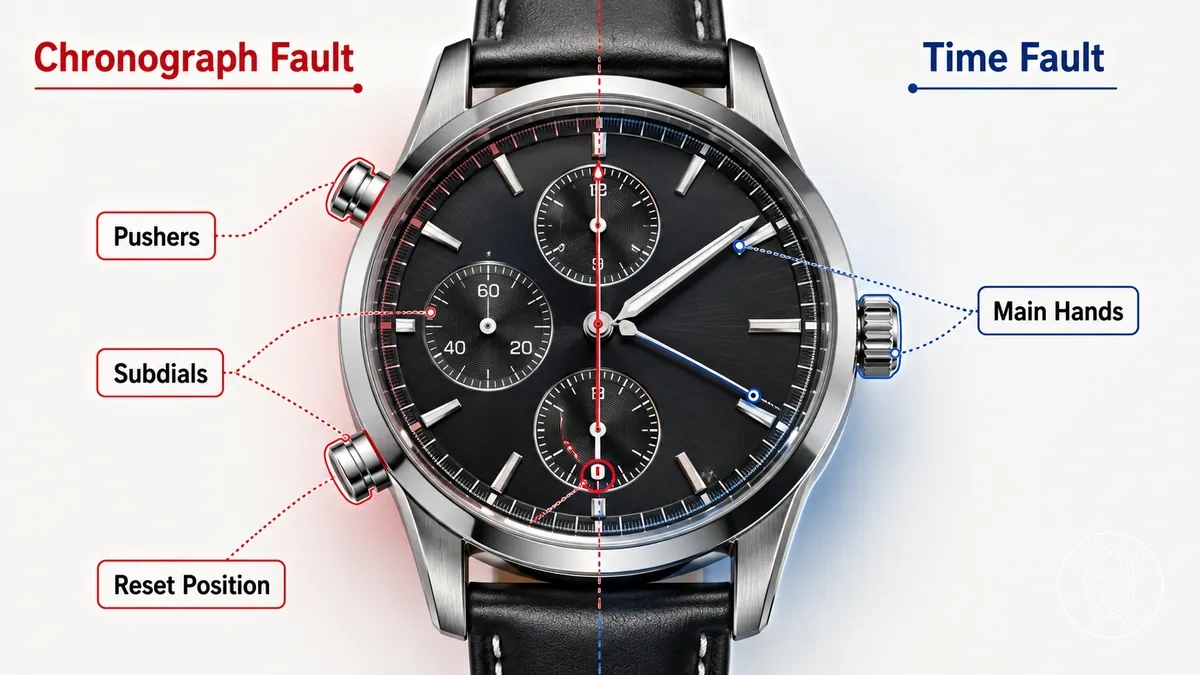
| Fault area | What the reader sees |
|---|---|
| Chronograph function | The main time display continues while the elapsed-time function does not start, stop or continue; Citizen Watch documents normal time display and B620 chronograph measurement as separate simultaneous functions. |
| Main time display | The main hour, minute or seconds indication is stopped or incorrect, so the visible symptom belongs to normal watch time faults rather than only to the stopwatch mechanism. |
| Pusher control | The expected start, stop or reset response is absent even though the main time display remains active; on Citizen B620, the upper-right pusher controls start and stop, while the lower-right pusher performs reset when the chronograph is stopped. |
| Reset position | The chronograph seconds hand does not return to the 0-second reference position after reset while the main hands can still indicate time; Citizen Watch provides a separate B620 correction procedure for this misalignment. |
| Battery or movement cue | The movement shows a defined power-state signal rather than complete timekeeping failure; on Citizen B620, one movement of the main seconds hand every 2 seconds is the insufficient-charge warning, during which the chronograph is unavailable while time and date continue to display. |
For example, Citizen Watch states that the B620 can continue showing the current time while its chronograph is unavailable during the 2-second insufficient-charge warning. If the main hands continue to indicate time but the stopwatch mechanism will not start under that condition, the observable boundary is the chronograph function rather than complete watch stoppage. That distinction directs the next diagnostic check toward battery state and chronograph controls instead of treating the symptom as a normal timekeeping fault.
How chronograph watch problems usually show up
Chronograph problems usually show up as starting, stopping, reset, alignment, pusher, or timing symptoms. How chronograph watch problems usually show up is easiest to diagnose from visible behavior before assigning a cause, and the image below labels the main symptom areas to check.
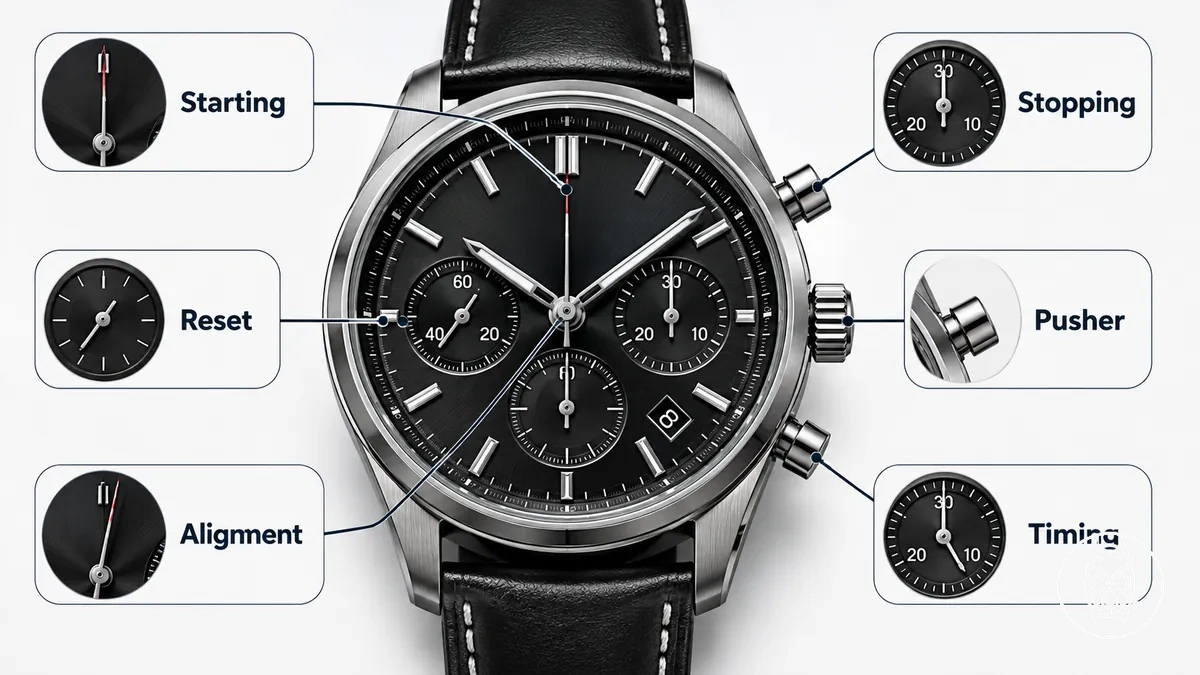
A symptom should first identify the affected part or function, then its visible behavior, likely diagnostic meaning, and next safe check. Citizen Watch specifies for movement B620 that the crown must be fully pushed in for chronograph operation, while Seiko specifies for movement V192 that the stopwatch operates with the crown in its normal position. Citizen also states that the B620 chronograph is unavailable during its 2-second insufficient-charge warning, while Seiko states that the V192 stopwatch will not operate when its small seconds hand moves every 2 seconds. These movement-specific conditions make crown position, pusher response, hand position, and battery or energy state useful checks before an internal fault is inferred.
- Starting: If the stopwatch hand remains stationary after the start control is pressed, the visible behavior is a chronograph that does not start. On Citizen B620, the documented 2-second insufficient-charge warning disables chronograph operation, so the next safe check is the power-state indication and crown position before treating the symptom as an internal fault.
- Stopping: If the elapsed-time function stops while the main watch continues to run, compare the stopping point with the movement's stated timing limit. Citizen Watch specifies that B620 measures up to 59 minutes 59.8 seconds and stops automatically after 60 minutes, while Seiko specifies a 60-minute maximum for V192; stopping at those limits is documented behavior rather than evidence of a fault.
- Reset: If reset is selected but the chronograph hand does not return to its reference position, the visible behavior points to the reset or hand-position system. Citizen Watch specifies a 0-second reference position for the B620 chronograph seconds hand, so the next safe check is the documented reference position rather than manually forcing the hand.
- Alignment: If chronograph hands remain away from zero after reset, the visible behavior is hand misalignment rather than a confirmed timing failure. Seiko specifies for V192 that the stopwatch 1/5-second and minute hands should stop at 0 seconds and 0 minutes after reset, so a different resting position directs the next check to the movement's preliminary-position procedure.
- Pusher: If a pusher produces no expected start, stop, or reset response, compare the button action with the movement instructions before inferring mechanical damage. Citizen Watch assigns the B620 upper-right pusher to start and stop and the lower-right pusher to reset while the chronograph is stopped, so the safe check is whether the correct control is being used in the documented operating state.
- Timing: If timing stops at a repeatable point, compare that point with the chronograph's documented capacity. Citizen B620 displays elapsed time to 59 minutes 59.8 seconds before its 60-minute automatic stop, while Seiko V192 measures up to 60 minutes in 1/5-second increments; a stop outside the documented behavior requires a movement-specific check.
For example, the main watch can continue showing time while the chronograph is unavailable: Citizen Watch states that B620 continues to display the current time during chronograph operation but disables the chronograph during the 2-second insufficient-charge warning. That visible behavior separates a stopwatch power-state symptom from complete watch stoppage. If starting, stopping, reset, alignment, pusher, or timing behavior does not match the documented control state or limit, the next diagnostic criteria should come from the specific movement type issues rather than from a universal diagnosis.
Chronograph stops or does not start
A chronograph that stops or does not start can indicate a power condition, start pusher issue, incorrect crown position, or movement constraint rather than a fully stopped watch. If the main time is running while the stopwatch hand remains stopped, the visible fault is limited to chronograph operation or an operating condition; check the documented crown position and battery condition before considering internal work.
The image below shows the start pusher, stopwatch hand, crown position, and main time hands used for these external checks before internal inspection.
The image below shows the start pusher, stopwatch hand, crown position, and main time hands used for these external checks before internal inspection.
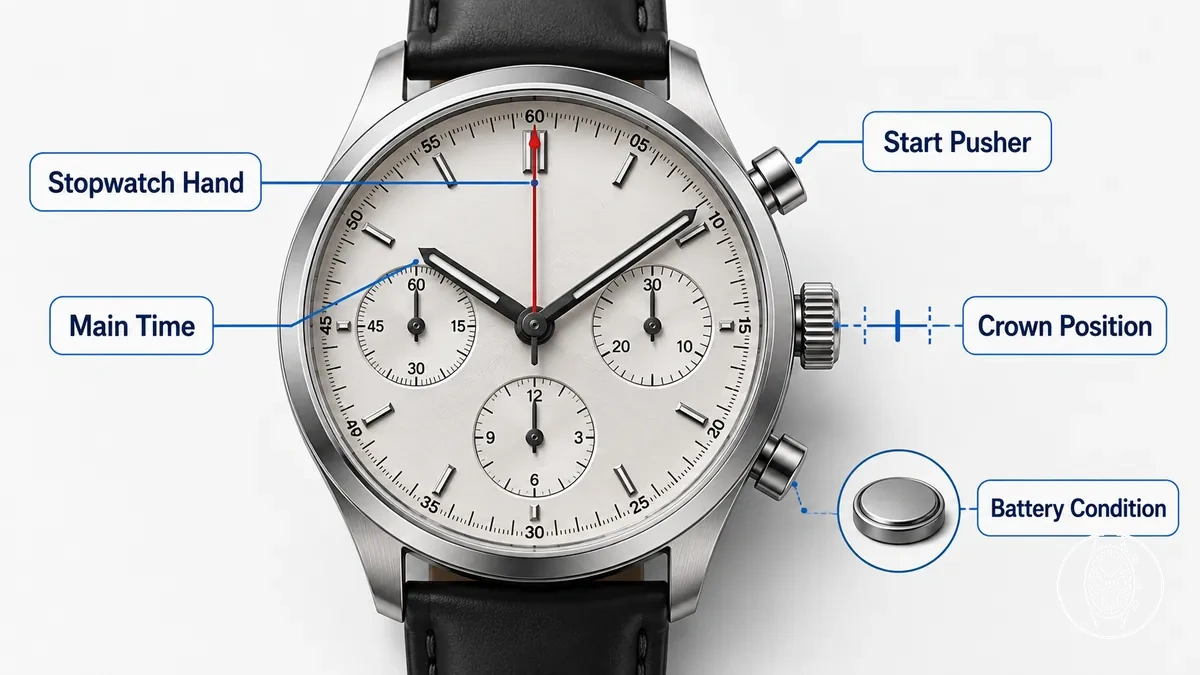
Three external checks distinguish power, control, and setting conditions. Citizen Watch specifies for its light-powered B620 movement that the chronograph cannot operate during the insufficient-charge warning, identified by the main seconds hand moving once every 2 seconds, and that the crown must be fully pushed in for chronograph operation. Seiko specifies for its solar V192 movement that the stopwatch will not operate while the small seconds hand moves every 2 seconds and that stopwatch operation requires the crown in its normal position. These are model-specific movement constraints, so a different movement requires its own operating instructions.
- Battery condition: Check whether the watch shows its documented low-power symptom. On Citizen B620 and Seiko V192, the cited 2-second seconds-hand movement indicates insufficient stored energy and chronograph operation is unavailable under that condition, so restore the documented charge state before diagnosing the stopwatch mechanism.
- Crown position: Check the crown before pressing the start pusher again. Citizen Watch specifies a fully pushed-in crown for B620 chronograph operation, while Seiko specifies the normal crown position for V192 stopwatch operation; a crown left in a setting position therefore provides a documented external condition to correct first.
- Start pusher and stopwatch hand: Observe whether the correct start control produces movement after the power and crown checks pass. Citizen Watch assigns the B620 upper-right pusher to start and stop, while Seiko assigns V192 Button A to start and stop; if the stopwatch hand still gives no response under the documented operating conditions while the main time continues running, those external power, setting, and control checks no longer explain the symptom.
Chronograph pushers feel stuck or unresponsive
Sticky pushers or unresponsive pushers can indicate dirt around the pusher tube, gasket friction, an incorrect crown state, moisture risk, or possible internal damage. Button travel and resistance provide the first external distinction: a pusher should be checked for whether it moves and returns after pressure, while a pusher that remains depressed or has abnormal resistance should not be repeatedly operated.
Sticky pushers or unresponsive pushers can indicate dirt around the pusher tube, gasket friction, an incorrect crown state, moisture risk, or possible internal damage.
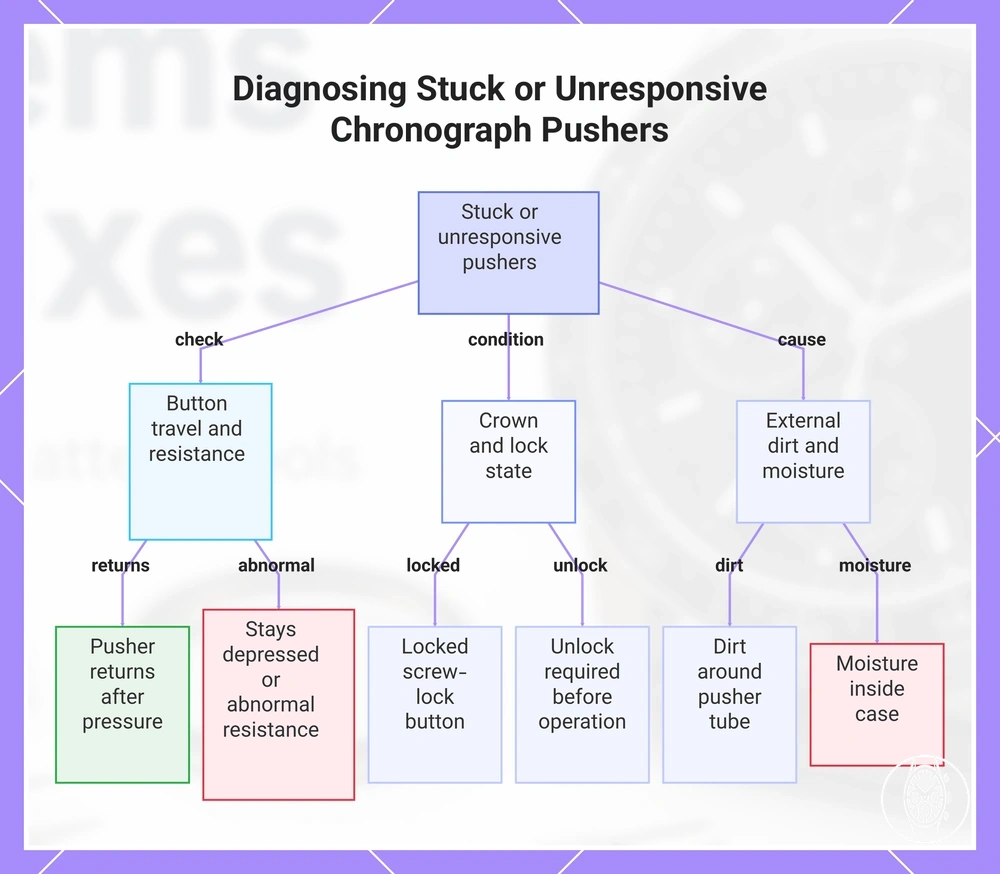
Chronograph pushers that feel stuck or unresponsive should be checked externally for control state, visible dirt, return movement, and water exposure before an internal fault is inferred. Seiko specifies for its V192 that dirt around a screw-lock button can impair operation and that the button cannot be operated while locked; Citizen likewise specifies for watches with screw-down push buttons that the control must be released from its locked state before operation. The useful criterion is therefore whether the correct pusher has normal button travel and returns after pressure when its documented crown state and button-lock state permit chronograph operation.
- Button travel and resistance: Press only as needed to observe the control. If the pusher moves inward and returns, its return state is present; if it stays depressed or resistance is abnormal, stop repeated operation because the external observation cannot distinguish gasket friction from an internal mechanical condition.
- Dirt and pusher tube: Inspect the visible junction around the pusher tube for dirt or debris. Seiko's V192 instructions identify dirt around the screw-lock button as a condition that can prevent proper operation, so visible contamination provides a supported external explanation without establishing internal damage.
- Crown state and control state: Compare the crown and pusher positions with the movement instructions. Seiko specifies that a locked V192 screw-lock button cannot be operated, while Citizen specifies that applicable screw-down push buttons must be unlocked before use; an unresponsive control in its locked state therefore does not by itself establish a chronograph fault.
- Moisture: If the case is wet or moisture is visible inside the watch, stop operating the pushers. Citizen warns that operating the crown or buttons while a watch is wet can allow water to enter and damage internal components, so visible internal moisture or persistent fogging changes the next step from further pusher testing to professional inspection.
This chart shows the external checks and conditions to evaluate when chronograph pushers feel stuck or unresponsive.
Chronograph hands do not reset to zero
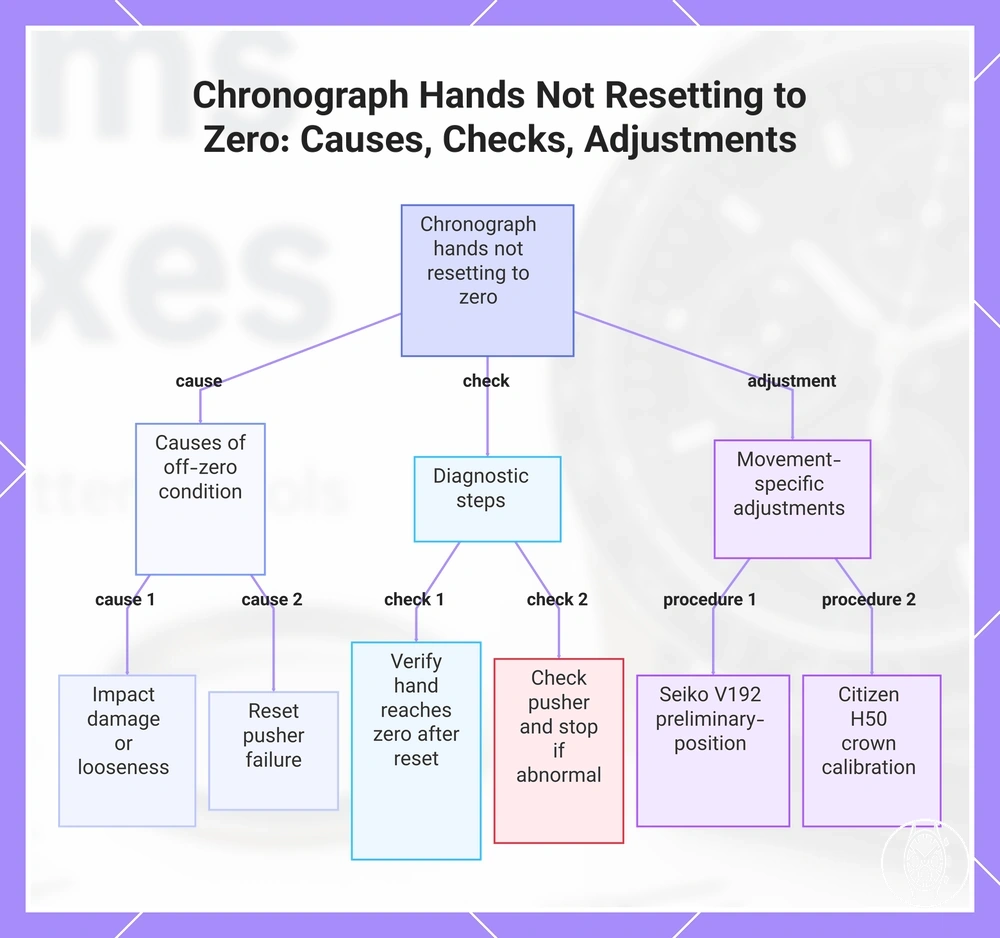
Chronograph hands that do not reset to zero most directly indicate an off-zero reference or alignment condition, but impact damage, looseness, or reset pusher failure can require inspection when the controls also behave abnormally. Seiko specifies for the V192 movement that its central seconds hand used for 1/5-second timing and its stopwatch minute hand should rest at 0 seconds and 0 minutes after reset; Seiko also identifies strong impact as one cause of preliminary-position misalignment. If a hand is physically loose or the reset pusher has abnormal resistance or no normal response, stop repeated operation rather than assuming alignment is the only fault.
The central seconds hand and subdial hands should be compared with the movement's specified zero marker before any full recalibration is attempted.
The central seconds hand and subdial hands should be compared with the movement's specified zero marker before any full recalibration is attempted. Citizen specifies for its H50 movement that an off-zero chronograph second hand is adjusted in crown calibration mode with the crown at position 2, where each button press moves that hand in 1-second increments; Citizen separately requires its chronograph minute hand to point to 0 minutes. Seiko's V192 uses a different preliminary-position procedure, so crown position and the affected hand must be identified from the movement instructions rather than treated as one common reset sequence. The most useful check is whether each affected chronograph hand reaches its specified zero position after a normal reset while the reset pusher operates normally.
Post-battery-change alignment also requires movement-specific evidence rather than an assumption that battery replacement itself moves the hands.
Post-battery-change alignment also requires movement-specific evidence rather than an assumption that battery replacement itself moves the hands. Seiko documents preliminary-position adjustment after a built-in IC reset on the V192, while Citizen's H50 documentation requires adjustment when its chronograph hands do not indicate 0 minutes and 0 seconds; if an off-zero symptom appears after power work, verify the movement's documented reference-position procedure before further repair.
This chart shows the common causes, essential checks, and movement-specific adjustment procedures for chronograph hands that do not reset to zero.
This chart shows the common causes, essential checks, and movement-specific adjustment procedures for chronograph hands that do not reset to zero.
Chronograph timing looks inaccurate
Chronograph timing can look inaccurate because stopwatch timing and normal timekeeping are separate measurements, and the cause can involve movement design, battery strength or stored power, mechanical rate variation, long chronograph use, or user reading error. A timing difference should first be classified as an elapsed-time measurement issue or a main time accuracy issue rather than treated as one universal chronograph fault. The safest first check is whether the stopwatch and main time show the same symptom under the movement's documented operating conditions.
Model-specific specifications provide useful boundaries for that comparison.
Model-specific specifications provide useful boundaries for that comparison. Citizen Watch specifies that its solar B620 has main time accuracy within ±15 seconds per month when used between +5°C and +35°C, while its chronograph displays elapsed time to 59 minutes 59.8 seconds and stops automatically after 60 minutes; Citizen also states that chronograph operation is unavailable during the 2-second insufficient-charge warning. Seiko specifies that its solar V192 measures stopwatch timing for up to 60 minutes in 1/5-second increments, so display resolution and the measurement limit should be checked before a small apparent difference is treated as inaccurate timing. These values are movement-specific criteria, not a shared accuracy tolerance for all chronographs.
- Stopwatch timing: Compare the elapsed-time measurement with the movement's stated resolution and maximum duration. Seiko V192 uses 1/5-second increments for up to 60 minutes, while Citizen B620 displays up to 59 minutes 59.8 seconds before its 60-minute automatic stop; reading between marked increments or beyond the stated measuring period can create user reading error without establishing a movement fault.
- Normal timekeeping: Check whether the main time also gains or loses time when the chronograph is not being measured. Citizen specifies ±15 seconds per month for B620 at +5°C to +35°C, while Seiko explains that mechanical watch accuracy is assessed as a mean daily rate and can change with winding state, temperature, position, arm movement, and conditions of use; the applicable movement specification therefore determines the comparison.
- Battery strength: Check the documented power-state indication before judging chronograph timing. Citizen states that B620 chronograph operation is disabled while its main seconds hand moves once every 2 seconds for the insufficient-charge warning, so that symptom points to a power condition rather than an accuracy result.
- Mechanical rate: Judge a mechanical rate over the period specified for that movement rather than from one short stopwatch comparison. Seiko states that mechanical watch gain or loss is normally assessed from average daily rates over about one week to ten days because winding state, temperature, position, and use can change the observed rate.
For example, a Citizen B620 that stops its chronograph at the documented 60-minute limit is showing its specified long-use boundary rather than evidence that the stopwatch lost time, while a Seiko V192 hand read between its 1/5-second marks can produce user reading error at a finer scale than whole seconds. If elapsed-time measurement still appears inconsistent after battery strength, display resolution, measurement duration, and main time accuracy are separated, compare the result with the specification for that exact movement rather than applying a universal accuracy claim.
What causes common chronograph problems
Common causes of chronograph problems fall into six diagnostic groups: power, control, contamination, alignment, moisture, and movement condition. Each group affects the chronograph function differently, so the visible symptom should be matched to the affected part and condition before a fix is chosen. If moisture, abnormal resistance, impact damage, or unexplained stoppage is present, inspection is more appropriate than assuming an external adjustment will correct the fault.
Power and control conditions can disable the chronograph while normal timekeeping continues.
Power and control conditions can disable the chronograph while normal timekeeping continues. Citizen Watch specifies for its B620 movement that chronograph operation is unavailable during the insufficient-charge warning, identified by the main seconds hand moving once every 2 seconds, while Seiko specifies for V192 that its stopwatch will not operate when the small seconds hand moves every 2 seconds; Seiko also states that a locked screw-lock button cannot be pressed and that dirt around the screw or button can impair operation. These model-specific findings show that power state, pusher state, crown position, and contamination should be checked against the movement instructions before internal damage is inferred. :contentReference[oaicite:0]{index=0}
| Cause group | Part or condition | Likely effect | Diagnostic criterion |
|---|---|---|---|
| Power | Battery or stored-energy condition | The chronograph can become unavailable while the main time still runs; Citizen B620 and Seiko V192 both document a 2-second seconds-hand warning condition that prevents chronograph operation. | Check the movement's documented power indication before diagnosing a mechanical chronograph fault. |
| Control | Pusher or crown operating state | A locked pusher or incorrect operating state can prevent start, stop, or reset input from reaching the chronograph function. | Confirm the documented crown and pusher positions for the movement before treating the symptom as internal failure. |
| Contamination | Dirt around the pusher or pusher tube | Button travel can become restricted or inconsistent; Seiko identifies dirt around the V192 screw-lock button as a condition that can prevent proper operation. | Inspect visible dirt and observe whether the pusher moves and returns normally. |
| Alignment | Chronograph hand reference position | A chronograph hand can reset away from its zero marker while the movement continues to run; Seiko specifies 0 seconds and 0 minutes as the V192 stopwatch-hand reference positions after reset. | Compare each affected hand with its movement-specific zero position before treating the symptom as a timing failure. |
| Moisture | Wet case, controls, seals, or visible internal fogging | Operating controls while wet can permit water entry and damage internal components; Citizen warns against operating the crown or buttons while a watch is wet. | Stop control testing when moisture is visible and move the diagnosis to inspection. |
| Movement condition | Internal resistance, wear, impact damage, debris, or damaged components | The chronograph can stop, reset incorrectly, or interfere with normal timekeeping even when external conditions appear correct. | If power, control, contamination, and alignment checks do not explain the symptom, the exact internal cause remains an inspection finding rather than an external diagnosis. |
For example, Citizen Watch states that the B620 can continue displaying the main time while its chronograph is unavailable during the 2-second insufficient-charge warning, so a non-starting stopwatch under that condition is a power-state symptom rather than proof of movement damage. By contrast, a chronograph hand that moves but resets away from zero points first to alignment, while visible moisture or abnormal mechanical resistance changes the next step to inspection. Matching each symptom to its part, condition, and effect prevents a model-specific behavior from being treated as a universal cause.
Low power and battery-related symptoms
Low power can affect a quartz chronograph even while normal timekeeping still appears to work, so battery symptoms include a chronograph-only restriction as well as full stoppage. Citizen Watch specifies for movement B620 that the chronograph cannot operate during its 2-second insufficient-charge warning, while the watch can continue displaying the main time. Treat that documented power warning as a power condition first, but do not treat battery replacement as proof that every chronograph fault is resolved. :contentReference[oaicite:0]{index=0}
Treat that documented power warning as a power condition first, but do not treat battery replacement as proof that every chronograph fault is resolved.
Low power and battery-related symptoms should be checked against battery age, battery drain during chronograph use, the condition of a fresh battery, and post-replacement behavior. Seiko specifies approximately 3 years of battery life for its quartz 8T63 movement, but that figure is model-specific and does not establish one replacement interval or one battery-drain rate for every chronograph. The reviewed official sources do not provide a universal numerical drain rate for leaving a chronograph running, so that effect should be judged from the exact movement's battery-life assumptions rather than converted into an unsupported percentage or duration. :contentReference[oaicite:1]{index=1}
- Battery age: Compare battery age with the rated life for the exact quartz chronograph movement. Seiko lists approximately 3 years for calibre 8T63, so an older installed battery is a supported reason to investigate power, but age alone does not establish the cause of the fault. :contentReference[oaicite:2]{index=2}
- Battery drain: Leaving the chronograph running adds an operating condition that can affect the movement's energy use, but no universal drain value is supported across chronographs. Use the battery-life conditions stated for the exact movement rather than assuming a fixed loss per hour.
- Fresh battery: A fresh battery should match the movement's specified battery type and installation requirements. Citizen's 0510 instructions require the correct battery specification and state that chronograph-hand adjustment may still be needed after the battery is changed, so immediate abnormal behavior does not by itself prove that the new battery is weak. :contentReference[oaicite:3]{index=3}
- Post-replacement behavior: Check whether the chronograph starts, resets, and returns its hands to their specified reference positions after replacement. Citizen specifies for movement 0520 that if the chronograph second hand does not return to 0 seconds after battery replacement, zero positioning is required; that symptom is an alignment condition rather than evidence of continuing battery weakness. :contentReference[oaicite:4]{index=4}
- Full stoppage: If both normal timekeeping and the chronograph have stopped, the symptom is broader than the B620-style chronograph-only restriction during a 2-second low-power warning. If the correct fresh battery or restored charge does not restart the main time, the remaining condition requires movement-specific diagnosis rather than another assumed battery fix. :contentReference[oaicite:5]{index=5}
Battery replacement is therefore one diagnostic branch, not a guaranteed repair. If correct power is restored but the chronograph remains unresponsive, resets away from zero, or shows abnormal post-replacement behavior, the symptom points to a separate control, alignment, or movement condition that needs its own check. :contentReference[oaicite:6]{index=6}
Pusher, crown, and case contamination
Pusher, crown, and case contamination can restrict chronograph control when visible debris builds up around a pusher or crown, or when gasket friction creates a resistance change. Citizen Watch states that accumulated dirt and dust around crowns and buttons can harden and make those controls stick. If a pusher stops returning normally, the crown no longer seats correctly, or a visible case gap appears, stop repeated operation and treat the condition as requiring inspection rather than assuming surface contamination is the only cause. :contentReference[oaicite:0]{index=0}
Citizen Watch states that accumulated dirt and dust around crowns and buttons can harden and make those controls stick.
Pusher, crown, and case contamination can be assessed externally by checking control travel, seating, debris, moisture, and changes in resistance without opening the case. Citizen Watch instructs users to keep the crown fully pushed into its normal position and to secure a screw-lock crown when fitted; it also warns against operating the crown or buttons during water exposure because water can enter and damage internal components. An external inspection can therefore confirm visible debris, abnormal pusher travel, crown seating, a visible case gap, and moisture, but it cannot confirm the condition of an internal gasket or distinguish gasket friction from internal damage. The useful maintenance criterion is whether the controls are dry, correctly seated, free of visible obstruction, and moving with their normal return action.
- Pusher travel: Check whether the pusher moves inward and returns after release. Restricted travel, failure to return, or a clear resistance change is a stop condition for repeated operation because the external symptom does not identify whether contamination, gasket friction, or an internal fault is responsible.
- Crown seating: Check whether the crown reaches its documented normal position and whether a screw-lock crown is securely seated when the watch uses one. A crown that remains visibly displaced or leaves a case gap should be inspected before normal sealing or control operation is assumed.
- Visible debris: Inspect the exposed junctions around the pusher, crown, and case. Citizen Watch identifies accumulated dirt and dust around crowns and buttons as a condition that can make them stick, so visible debris supports an external contamination finding without proving internal damage.
- Water exposure: Do not operate the pusher or crown while the watch is wet. Citizen Watch warns that operating these controls under wet conditions can allow water into the case; visible internal moisture or persistent fogging therefore changes the maintenance action from external checking to inspection.
- Case gap: Treat a visible gap, displaced pusher, or poorly seated crown as a sealing and alignment concern rather than a routine surface-cleaning condition. External observation cannot establish whether the underlying gasket or case interface remains intact.
- Resistance change: Compare current pusher and crown movement with their previous normal action. A new increase in resistance after dirt, impact, or water exposure can be consistent with contamination or gasket friction, but the exact internal cause remains an inspection finding.
Routine external care is appropriate only while the pusher and crown continue to move and seat normally and no moisture or case gap is visible. Citizen Watch advises periodic movement of crowns and buttons to reduce sticking from accumulated foreign material; persistent resistance, poor seating, or moisture sets the boundary for professional inspection rather than deeper user intervention.
Hand misalignment after reset, impact, or movement strain
Chronograph hand misalignment is present when the central stopwatch hand or subdial hands fail to return to their movement-specified zero marker after reset use; documented triggers include impact and movement-specific electronic reset conditions, while battery change or suspected movement strain should not be assumed as the cause without movement-specific evidence. Seiko specifies for calibre V192 that its stopwatch 1/5-second hand and minute hand should return to 0 seconds and 0 minutes, and states that strong impact can shift their preliminary positions. If a hand appears loose, the crown or reset control behaves abnormally, or the hands remain displaced after the documented position check, further adjustment should stop and the movement should be inspected. :contentReference[oaicite:0]{index=0} :contentReference[oaicite:1]{index=1}
The most useful criterion is whether every affected hand returns to its specified zero marker after the normal reset procedure for that movement.
Hand misalignment after reset, impact, or movement strain should be separated by which hand misses zero and what happened before the symptom appeared. Seiko's V192 guidance identifies external influence and a built-in IC reset as conditions that can leave stopwatch hands outside their preliminary position, while Citizen specifies for calibre 0510 that its chronograph second hand is corrected to 0 seconds with the crown pulled out two steps; these are movement-specific procedures rather than one reset sequence for every chronograph. A battery change should therefore be treated as relevant only when the exact movement documentation links post-replacement behavior to a zero-position or reset check. The most useful criterion is whether every affected hand returns to its specified zero marker after the normal reset procedure for that movement. :contentReference[oaicite:2]{index=2}
- Zero marker: Compare each chronograph hand with its documented reference position after reset. Seiko V192 specifies 0 seconds for the central stopwatch 1/5-second hand and 0 minutes for the stopwatch minute hand; a different resting position identifies an alignment symptom rather than proving internal damage. :contentReference[oaicite:3]{index=3}
- Central stopwatch hand: If the central stopwatch hand alone misses zero, check its own reference position before judging elapsed-time accuracy. Citizen calibre 0510 uses 0 seconds as the chronograph second-hand correction position, with the crown pulled out two steps during its documented adjustment mode. :contentReference[oaicite:4]{index=4}
- Subdial hands: If a subdial hand misses its reference point while the central hand reaches zero, treat that subdial as a separate alignment symptom. Seiko V192 requires its stopwatch minute hand to return to 0 minutes, so one correctly aligned hand does not establish that all chronograph hands are aligned. :contentReference[oaicite:5]{index=5}
- Crown position and reset sequence: Use only the crown position and reset sequence specified for the movement. Citizen calibre 0510 uses a crown pulled out two steps for chronograph-hand correction, while Seiko V192 uses its own preliminary-position procedure; those control states should not be generalised into a brand-independent sequence. :contentReference[oaicite:6]{index=6}
- Physical shock: If hand misalignment began after impact, physical shock is a documented cause to consider. Seiko states that dropping or hitting a V192 watch can misalign its preliminary hand positions; persistent displacement after the specified position check warrants inspection rather than an assumed movement-strain diagnosis. :contentReference[oaicite:7]{index=7}
Battery change does not provide a universal explanation for chronograph hand misalignment because post-power procedures differ by movement, and the reviewed manufacturer guidance does not establish one measurable movement-strain threshold that can be diagnosed from an off-zero hand alone. Treat post-battery-change alignment as movement-specific, and use the exact movement manual to determine whether a zero-position or electronic-reset check is required before concluding that internal strain or damage is present.
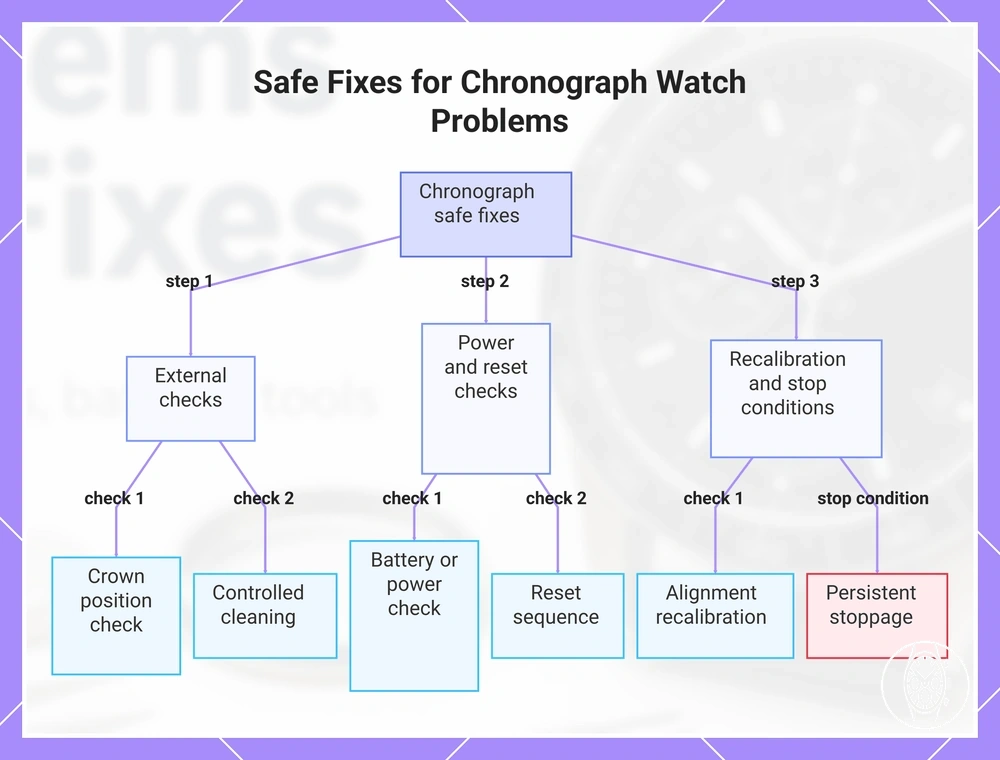
Safe fixes for chronograph watch problems
Safe fixes for chronograph watch problems should begin with external checks, power checks, controlled cleaning, and model-appropriate recalibration before any invasive repair. These checks can resolve an incorrect crown state, insufficient power, surface contamination, or hand-position issue without assuming internal movement damage. Stop owner-level work if moisture, damaged controls, abnormal resistance, or persistent stoppage is present.
Stop owner-level work if moisture, damaged controls, abnormal resistance, or persistent stoppage is present.
Safe fixes for chronograph watch problems should proceed from the least invasive check to the point where the symptom requires watchmaker-level work. Citizen Watch specifies for calibre B620 that a non-working chronograph should first be recharged, checked with the crown fully pushed in, and reset; Citizen also specifies that the chronograph is unavailable during its 2-second insufficient-charge warning. If those documented operating conditions are correct but the fault remains, the next action should match the remaining symptom rather than involve opening the case. The key decision signal is whether normal chronograph operation returns after the documented power, crown, control, and reset checks. :contentReference[oaicite:0]{index=0}
- Test stop, start, and reset: With the watch dry and the controls moving normally, perform the movement's documented start, stop, and reset sequence once. Citizen Watch specifies for B620 that the upper-right pusher starts and stops the chronograph and the lower-right pusher resets it while stopped; failure after the correct sequence means incorrect button use no longer explains the symptom.
- Check crown position: Put the crown in the operating position specified for the movement before retesting the chronograph. Citizen Watch specifies that B620 chronograph operation requires the crown fully pushed in, so restored operation after correcting the crown position identifies an external control-state issue rather than confirmed internal damage.
- Check battery or stored power: Look for the movement's documented battery or energy symptom before diagnosing mechanical stoppage. Citizen Watch specifies that B620 chronograph operation is disabled while the seconds hand shows its 2-second insufficient-charge warning, so restoring the documented charge state is the appropriate power check before escalation.
- Keep controlled cleaning external: Remove only loose surface contamination that can be addressed without opening the case, forcing a pusher, or disturbing seals. If the pusher remains stuck, fails to return, or develops abnormal resistance after visible debris is cleared, stop cleaning because the remaining condition can involve a gasket, pusher assembly, or internal component that cannot be confirmed externally.
- Use recalibration only for an alignment symptom: If the chronograph runs but a hand does not return to its documented reference position, use only the movement-specific hand-position procedure. Citizen Watch specifies 0 seconds as the B620 chronograph second-hand correction position, while Seiko specifies 0 seconds and 0 minutes for the V192 stopwatch hands; these model-specific values show why one recalibration sequence should not be applied universally.
- Apply stop conditions: End owner-level troubleshooting when moisture is visible, a crown or pusher is damaged, resistance changes abnormally, the watch remains stopped after its documented power check, or recalibration does not restore the specified reference position. Citizen Watch directs B620 users to an authorised service centre when the watch remains non-operational after charging, which provides a clear boundary between external checks and watchmaker-level work.
These safe fixes are diagnostic actions, not a guaranteed repair path. A chronograph that returns to normal after a power, crown, reset, controlled-cleaning, or documented alignment check can remain within owner-level troubleshooting, while persistent stoppage, moisture, damaged controls, abnormal resistance, or unresolved misalignment indicates watchmaker-level work because the remaining cause may be inside the case.
These safe fixes are diagnostic actions, not a guaranteed repair path.
This chart shows the step-by-step diagnostic checks and stop conditions for safely troubleshooting chronograph watch issues without invasive repair.
Checking power symptoms before opening the case
Checking power symptoms should come before case opening whenever a chronograph fault could be battery- or charge-related. Main time movement, chronograph start behavior, and weak seconds or skipping seconds can show whether the watch still has partial power without disturbing the case. Citizen Watch specifies for calibre B620 that the current time can continue to display during its 2-second insufficient-charge warning while the chronograph is unavailable, so that documented power condition should be addressed before internal access is considered. :contentReference[oaicite:0]{index=0}
Checking power symptoms should come before case opening whenever a chronograph fault could be battery- or charge-related.
These external observations help separate a likely power condition from a fault that remains after normal operating checks. Citizen Watch instructs B620 users with abnormal or stopped seconds-hand movement to confirm that the crown is fully pushed in and restore charge before service escalation; Citizen also warns that battery service involving the case back can affect sealing if dust enters or water-resistance checks are not completed. Recent battery replacement therefore does not justify another case opening by itself, especially where water resistance, case design, or service conditions require controlled resealing. The useful criterion is whether normal time and chronograph operation return after the documented power and crown checks without removing the case back.
- Main time movement: Observe whether the normal time display continues to move. On Citizen B620, main time can remain displayed during the documented 2-second insufficient-charge warning, so running main time does not exclude a power symptom affecting chronograph operation.
- Chronograph start behavior: Check whether the chronograph starts while normal timekeeping continues. Citizen Watch specifies that B620 chronograph operation is unavailable during its 2-second insufficient-charge warning, so that combination identifies a documented power-state condition rather than proving chronograph mechanism damage.
- Weak seconds: Treat weak seconds, skipping seconds, or interval movement as movement-specific power evidence only when the manufacturer defines that pattern. Citizen Watch defines one movement of the B620 seconds hand every 2 seconds as insufficient charge, while Seiko specifies a similar 2-second warning condition for calibre V192; these values should not be generalised to every chronograph movement.
- Recent battery replacement: If the symptom began after recent battery replacement, verify the correct battery specification and documented post-service checks before assuming another battery is needed. If the case design or water resistance requires controlled opening, resealing, or pressure verification, further owner case opening is not supported by the external evidence.
- Chronograph left running: Record whether the chronograph was left running, but compare that observation with the exact movement specification before attributing battery drain. Citizen Watch specifies that B620 stops chronograph measurement automatically after 60 minutes and displays up to 59 minutes 59.8 seconds, so that model does not remain in continuous timing operation indefinitely.
Case opening should stop being an owner-level option when power checks remain unresolved, moisture is present, or water resistance could be affected by disturbing the case back. If the correct power condition is restored but main time movement, chronograph start behavior, or seconds-hand movement remains abnormal, the unresolved symptom requires movement-specific inspection rather than repeated case access.
Freeing sticky pushers without risking water resistance
Sticky pushers should be handled from the outside unless the chronograph is being properly serviced, because pusher cleaning can affect the area around the seals without confirming the internal gasket condition. Citizen Watch states that dirt and dust can collect around crowns and buttons until the controls become difficult to operate, while Seiko warns that contamination around chronograph buttons can interfere with normal operation. Limit owner care to gentle surface cleaning and dry debris removal, and stop if the pusher does not move and return normally. :contentReference[oaicite:0]{index=0}
Limit owner care to gentle surface cleaning and dry debris removal, and stop if the pusher does not move and return normally.
Freeing sticky pushers without risking water resistance requires checking the exposed pusher before trying to change its movement. Citizen Watch advises wiping dirt and moisture from the watch case and keeping crowns and buttons free of accumulated foreign material, while manufacturer guidance also warns against operating controls when the watch is wet because water can enter through compromised sealing areas. Gasket risk cannot be confirmed from pusher feel alone, so a pusher that remains restricted, develops a clear resistance change, or shows moisture signs has reached the stopping point for owner-level cleaning. The practical criterion is simple: continue only while the pusher is dry, externally clean, and returning normally without added force.
- Do — surface cleaning: Wipe the exposed pusher and surrounding case gently with a clean, soft, dry cloth, and remove only loose visible debris that can be reached without disturbing the control opening.
- Do — check pusher return feel: If the pusher is dry and designed for normal operation in its present state, observe whether it moves inward and returns to its original position. Normal return after dry debris removal supports an external contamination issue, while continued sticking or a resistance change leaves gasket friction or an internal condition unresolved.
- Do — check moisture signs: Look for water on the case, persistent fogging beneath the crystal, or known water entry before using the pusher. Moisture changes the condition from routine pusher cleaning to a sealing concern because operating the control can allow further water entry.
- Do not — force a resistant pusher: Stop when extra effort would be required to make the control move or return. Increased resistance can result from hardened contamination, gasket friction, or an internal pusher condition that cannot be distinguished externally.
- Do not — continue after sealing concerns appear: A displaced control, visible case gap, persistent moisture, or abnormal return action moves the condition beyond routine surface cleaning because seal integrity cannot be verified from the outside.
The stopping point is reached when sticky pushers remain restricted after loose external debris is removed or when moisture signs, abnormal resistance, or a suspected seal problem is present. If moisture or sealing damage is visible, stop cleaning and treat the condition as one of the relevant water resistance issues before operating the chronograph again. Professional inspection is appropriate because external symptoms cannot establish whether the gasket, pusher assembly, or case seal requires repair.
Recalibrating chronograph hands that miss zero
Recalibrating chronograph hands that miss zero can restore their reference position on many quartz chronographs, but the crown position and pusher controls must match the exact movement instructions. Recalibration changes the reference position of the affected hands; it does not correct a loose hand, impact damage, or another physical movement fault. Seiko specifies for calibre V192 that stopwatch hands resting away from 0 seconds and 0 minutes require preliminary-position adjustment, so visible damage or abnormal control resistance is a stopping condition rather than a reason to continue adjustment. :contentReference[oaicite:0]{index=0}
Recalibration changes the reference position of the affected hands; it does not correct a loose hand, impact damage, or another physical movement fault.
Before resetting chronograph hands, identify the movement, affected hands, zero marker, crown position, and required pusher controls in the model-specific manual. Citizen Watch specifies for calibre 0510 that the crown is pulled out two steps and the upper-right button moves the chronograph second hand to 0 seconds, while Seiko specifies for V192 that the crown is placed at the second click and its stopwatch minute and 1/5-second hands are adjusted through movement-specific button operations. Citizen's calibre 0520 instructions also state that if the chronograph second hand does not return to 0 seconds after battery replacement, its zero position must be checked. The useful completion criterion is that every affected hand reaches the zero marker specified for that movement and the crown is returned to its documented operating position.
- Confirm which hands miss zero: Reset the chronograph normally and identify each affected hand. Seiko specifies for V192 that the stopwatch 1/5-second hand should rest at 0 seconds and the stopwatch minute hand at 0 minutes; a different resting position identifies an alignment condition rather than confirmed internal damage.
- Set the documented crown position: Use only the position specified for the movement. Citizen calibre 0510 uses the crown pulled out two steps for chronograph-second-hand correction, while Seiko V192 uses the second click for preliminary-position adjustment, so those positions are model-specific rather than interchangeable.
- Use the documented pusher controls: Move only the hand identified by the manual toward its stated zero marker. Citizen Watch specifies for calibre H50 that its chronograph second hand moves in 1-second increments during adjustment, providing a model-specific example of how precise pusher control can be defined.
- Check every affected hand: Do not assume that correcting the central stopwatch hand also aligns the subdial hands. Seiko V192 treats its stopwatch minute hand and 1/5-second hand as separate preliminary-position checks, so each hand must reach its own documented reference position.
- Complete the manual checks: Return the crown to its operating position and restore the main time if the movement instructions require it. If a chronograph hand still misses zero, repeatedly loses its reference position, appears loose, or moves abnormally after the documented procedure, stop recalibrating and move the diagnosis to movement inspection.
Battery-change context does not create one shared recalibration sequence because movements use different reference-position procedures. If the model-specific manual checks move the chronograph hands normally but they do not remain at their specified zero marker, the remaining condition falls outside hand-reference recalibration and should be inspected rather than repeatedly adjusted.
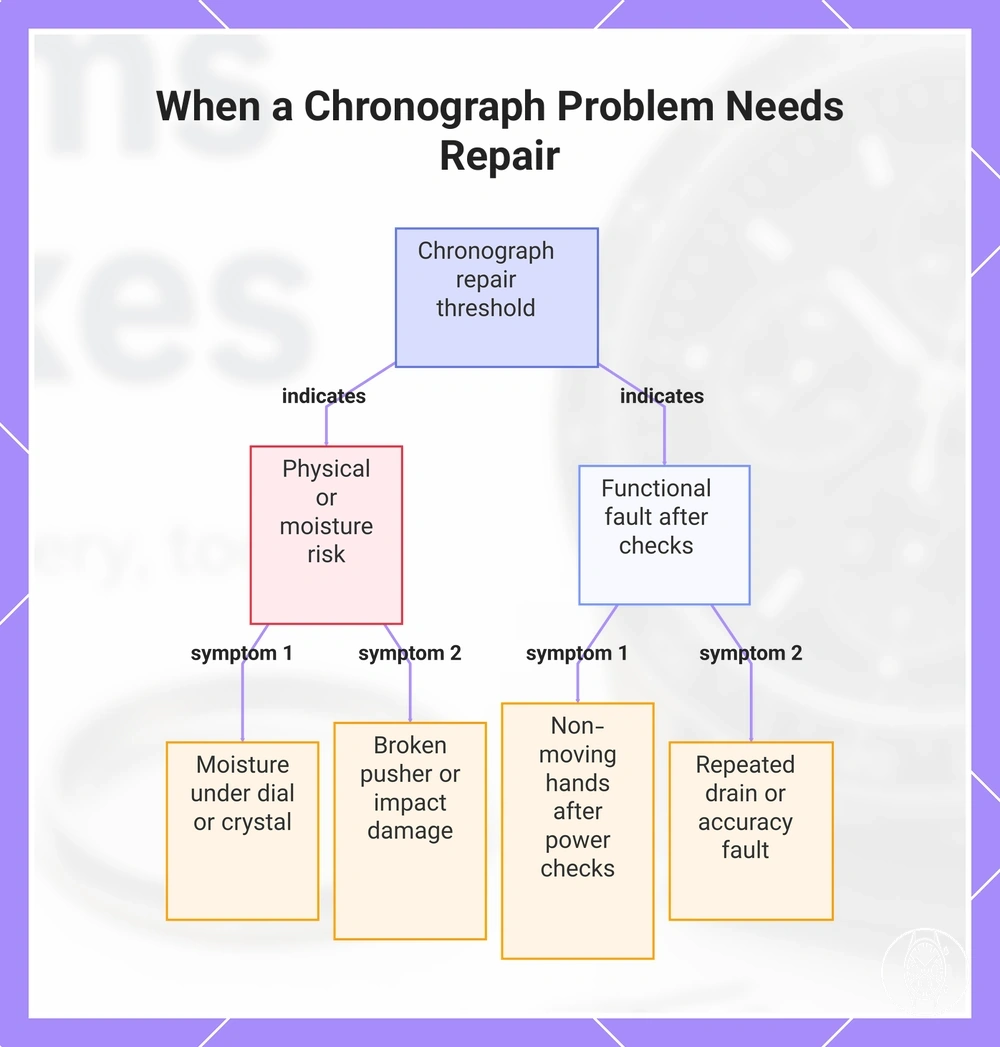
When a chronograph problem needs repair
A chronograph problem needs repair when the remaining symptoms point to possible internal damage, moisture, failed pushers, loose hands, repeated misalignment, or unresolved power faults rather than an external setting issue. Visible moisture, a broken or abnormally resistant control, or a loose hand is a higher-risk condition because further operation can worsen damage or interfere with sealing. Stop owner-level troubleshooting when one of those risk signals is present. :contentReference[oaicite:0]{index=0}
Stop owner-level troubleshooting when one of those risk signals is present.
When a chronograph problem needs repair, use symptom severity and persistence as the decision criteria. Citizen Watch advises service when water enters a watch or persistent internal fogging remains, and its B620 troubleshooting guidance escalates a watch that still does not run after the documented charging checks; Seiko likewise advises inspection when accuracy remains abnormal after the movement's normal operating conditions have been considered. The practical threshold is reached when the documented external checks no longer change the symptom or when further testing would involve opening the case, forcing a control, or disturbing a damaged component.
- Moisture under the dial or crystal: Visible droplets, persistent fogging, or known water entry indicate a sealing risk and justify repair rather than continued chronograph testing because moisture can affect internal components.
- Non-moving hands: If the main time or chronograph hands remain stopped after the movement's documented power and crown checks, the unresolved stoppage requires movement inspection rather than repeated external testing.
- Failed pushers: A pusher that stays depressed, does not return, feels broken, or develops abnormal resistance should not be forced. That condition can involve the pusher assembly, gasket, or an internal control component that cannot be confirmed from outside the case.
- Repeated battery drain or unresolved power faults: Repeated loss of power after the correct battery or charging procedure has been verified is a repair criterion because another battery alone does not establish the cause of the drain.
- Impact damage or loose hands: A chronograph problem that begins after a drop or strong impact, especially with a loose, displaced, or contacting hand, raises the risk of internal damage. Seiko notes that strong shock can affect accuracy and damage small movement parts.
- Accuracy change: Persistent gain or loss outside the movement's stated accuracy specification should be evaluated as a movement condition rather than corrected through chronograph controls. Seiko advises comparing the watch with the accuracy standard stated for its movement and seeking inspection when the problem remains.
- Failed recalibration: Repeated misalignment after the documented hand-reference procedure is a repair signal when the affected chronograph hands still miss zero or quickly lose alignment again.
A watch repair tool kit is inappropriate when the chronograph shows moisture, a broken or resistant pusher, loose hands, impact damage, or a sealed case whose water resistance would need to be restored and verified after opening. In that scenario, removing the case back does not identify the fault and can add sealing risk, so professional inspection is the more appropriate response. A chronograph therefore crosses the repair threshold when either a clear physical or moisture risk is present or a functional fault remains after the movement's documented external checks.
In that scenario, removing the case back does not identify the fault and can add sealing risk, so professional inspection is the more appropriate response.
This chart shows the two main conditions that indicate a chronograph problem requires professional repair: physical or moisture risks and persistent functional faults after external checks.
Repair signals that tools cannot safely solve
Some chronograph repair signals should not be treated as DIY tools problems because seized pushers, loose hands, stripped crown behaviour, internal rattling, or movement stoppage can indicate a mechanical or sealing fault that cannot be confirmed externally. Citizen Watch advises service when applicable screw-down crowns or buttons remain inoperative after their normal lock state has been checked. Stop owner-level work when a control is mechanically abnormal, a hand is loose, or the symptom points to possible internal damage. :contentReference[oaicite:0]{index=0}
Stop owner-level work when a control is mechanically abnormal, a hand is loose, or the symptom points to possible internal damage.
Repair signals that tools cannot safely solve are best separated from ordinary operating errors by completing only the movement's documented external checks. Citizen Watch directs users to inspection or repair when water enters a watch or persistent internal fogging remains, while Seiko states that a strong shock or drop can damage small parts inside a watch. The reviewed manufacturer guidance does not provide an external diagnostic threshold for internal rattling, so a new unexplained sound combined with abnormal chronograph function, timekeeping, or impact history should be treated as an inspection condition rather than proof of one failed part. The practical criterion is whether the fault remains after non-invasive checks or presents physical evidence that requires professional inspection.
- Seized pushers: If a chronograph pusher remains immobile after any documented screw-lock mechanism is correctly unlocked, stop trying to operate it. Citizen Watch advises service when applicable buttons still do not work or cannot be unlocked, so added force is not an appropriate diagnostic action.
- Loose hands: A visibly loose, displaced, or contacting chronograph hand is a physical fault rather than a normal reference-position issue. External recalibration cannot establish whether the hand mounting or another movement component is damaged, so professional inspection is the appropriate next step.
- Stripped crown: A crown that turns without carrying out its documented setting or winding function, slips instead of engaging its normal positions, or cannot engage those positions sets an inspection boundary. The reviewed manufacturer guidance provides no external method for confirming a stripped stem or internal crown component.
- Internal rattling: A new internal sound paired with erratic hand movement, movement stoppage, or recent impact should be professionally inspected because the source cannot be identified externally. Seiko states that dropping a watch or subjecting it to strong shock can damage small internal parts.
- Movement stoppage: Complete movement stoppage becomes a repair signal when the movement-specific power, charging, winding, or crown checks have been completed without restoring operation. At that point, DIY tools cannot identify the internal cause.
- Repeated failure after basic checks: If the same chronograph fault returns after the documented power, crown, pusher, reset, and hand-reference checks have been completed correctly, repeated external adjustment no longer explains the failure and professional inspection is the appropriate next level.
Moisture raises the repair threshold further because seal condition and internal damage cannot be established from outside the watch. Citizen Watch warns against operating crowns or buttons while a watch is wet because water can enter and damage internal components, and advises inspection or repair when water entry or persistent fogging is present. Treat those conditions as repair signals rather than a reason to continue DIY work.
Moisture, damage, and repeated failure symptoms
Moisture, visible damage, and repeat failures in a chronograph raise the condition beyond ordinary troubleshooting when there is persistent fog under crystal, water entry, a damaged case or crown, recurring stoppage, repeated misalignment, or worsening timekeeping. Citizen Watch warns that operating the crown or buttons while a watch is wet can let water enter and damage vital components, and it directs watches with water entry or fogging that does not clear after a long time to inspection or repair. Do not operate wet controls or assume that a seal and movement are unaffected merely because visible moisture later clears.
That “several days” instruction is specific to B620 rather than a universal recovery time for chronographs.
Moisture, damage, and repeated failure symptoms should be prioritised by physical evidence and whether the fault persists after the documented non-invasive check. For example, Citizen Watch specifies for movement B620 that a stopped or erratic seconds hand should first be checked with the crown fully pushed in and the watch left in direct sunlight for several days; if the seconds hand still does not move after charging, Citizen directs the owner to an authorised service centre. That “several days” instruction is specific to B620 rather than a universal recovery time for chronographs. The most useful criterion is whether the symptom persists after the exact movement's documented check or whether moisture or visible damage makes further operation inappropriate.
- Fog under crystal: Fogging that remains for a long time is a repair or inspection condition under Citizen Watch guidance. If fog disappears, the reviewed manufacturer guidance does not provide a visual test that proves the watch's seal, water-resistance status, or internal condition has recovered.
- Water entry: Confirmed water entry is an escalation condition because moisture can damage internal components. Citizen Watch instructs users not to operate the crown or buttons while the watch is wet and recommends inspection or repair when water has entered.
- Damaged case or crown: A cracked, displaced, poorly seated, or mechanically abnormal case, crown, or pusher creates a physical-damage condition whose seal integrity cannot be confirmed by appearance alone. Stop further chronograph operation when the damaged control or case interface shows abnormal movement, seating, or resistance.
- Recurring stoppage: Repeated stoppage after the movement's specified battery, power, crown, or charging check is an escalation signal. Citizen Watch's B620 example requires several days of direct-sunlight charging before service escalation for a seconds hand that remains stopped, but the reviewed evidence does not establish that duration as a threshold for other movements.
- Repeated misalignment: Chronograph hands that repeatedly miss their documented reference positions after the correct recalibration procedure indicate that reference-position adjustment has not resolved the symptom. The reviewed evidence does not specify a universal number of failed recalibrations that proves internal damage, so persistent recurrence is the relevant repair criterion.
- Worsening timekeeping: Increasing gain or loss alongside moisture, impact, recurring stoppage, or chronograph malfunction raises the need for movement-specific inspection. The reviewed evidence provides no universal accuracy threshold for all chronographs, so the measured gain or loss should be compared with the specification for the exact movement rather than with a single generic limit.
Visible moisture disappearing does not establish that water resistance has been restored, because the reviewed manufacturer guidance provides no external observation that verifies seal integrity after suspected water entry. Where moisture, visible damage, or repeat failures remain, professional inspection is the appropriate boundary rather than continued operation or repeated troubleshooting.
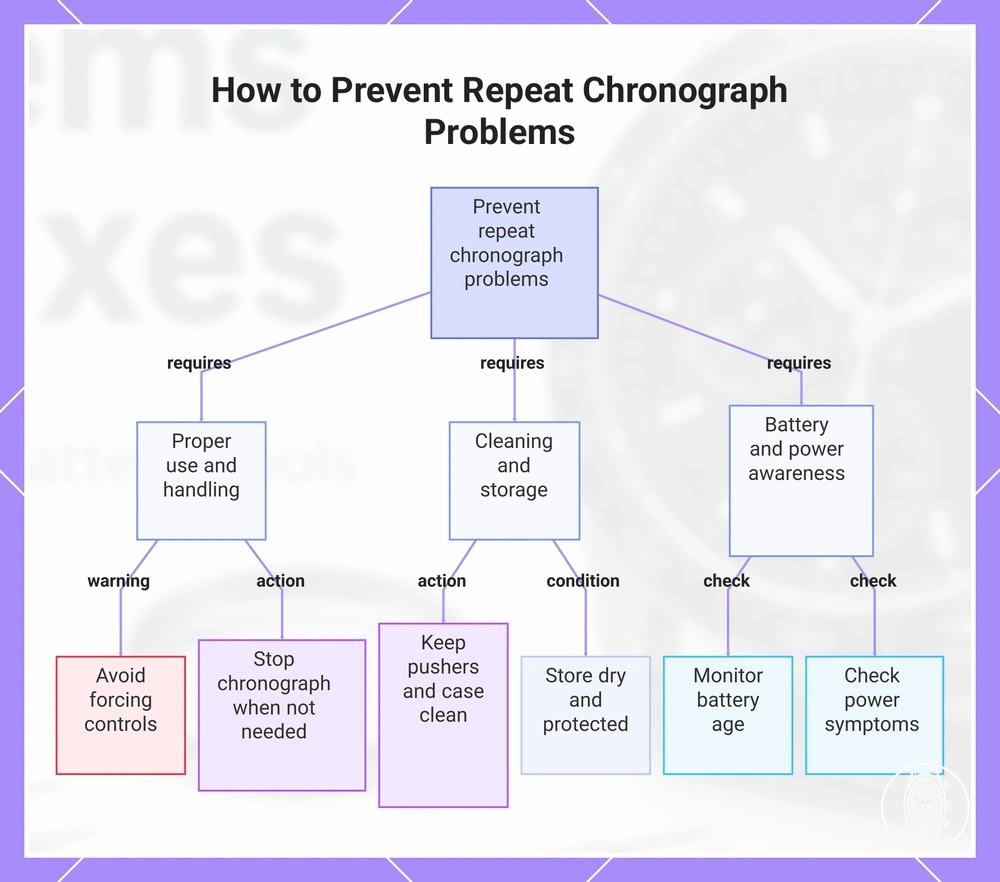
How to prevent repeat chronograph problems
To prevent repeat problems with a chronograph, combine proper use, cleaning, suitable storage, battery awareness, and water-resistance caution rather than relying on one maintenance action. The correct prevention routine is conditional on movement type, case condition, and usage pattern. Stop using a pusher, crown, or chronograph function when resistance, moisture, or abnormal hand movement appears. :contentReference[oaicite:0]{index=0}
The correct prevention routine is conditional on movement type, case condition, and usage pattern.
How to prevent repeat chronograph problems is best treated as a component-based maintenance routine. Citizen Watch specifies that applicable screw-lock crowns should be secured correctly and that crowns or buttons should not be operated while the watch is wet because water can enter and damage internal components; Citizen also advises prompt replacement of an expired battery in applicable quartz watches because leakage can damage the movement. The most useful maintenance criterion is that pushers move normally, the crown seats correctly, the power condition stays within the movement's documented operating state, and chronograph hands continue to return to their specified reference positions.
- Stop the chronograph when timing is not needed: End stopwatch operation when the measurement is complete rather than leaving the function running by habit. Chronograph duration limits and energy use are movement-specific, so the exact calibre instructions provide the applicable operating condition.
- Avoid forcing pushers: A pusher should move and return through its normal travel without added force. If a screw-lock pusher is fitted, unlock it according to the movement instructions before use; continued resistance after the correct control state is set is a stopping condition rather than a reason to press harder.
- Keep pushers and the case clean: Remove accessible dirt and moisture from external surfaces before deposits harden around controls. Citizen Watch maintenance guidance identifies accumulated contamination around watch components as a condition that can impair operation or contribute to corrosion, so cleaning should remain external and should not disturb seals.
- Monitor battery age and power symptoms: For replaceable-battery quartz movements, follow the calibre's specified battery type and service-life guidance rather than a generic replacement interval. For rechargeable movements, use the documented charge-state indication; recurring stoppage after the correct power procedure is no longer a routine battery-awareness issue.
- Protect seals from moisture: Keep the crown in its normal seated position, secure a screw-lock crown where fitted, and do not operate pushers or the crown while the watch is wet. Citizen Watch applies this restriction even to water-resistant watches because operating wet controls can permit water entry.
- Respond early to misalignment: If chronograph hands begin missing their documented zero or reference positions, check the exact movement's alignment procedure before the error becomes recurrent. Repeated misalignment after the correct reference-position check moves the condition beyond routine prevention.
Storage should support the same prevention pattern by keeping the chronograph dry, clean, protected from strong impacts, and in the power condition specified for its movement. These practices belong to chronograph watch maintenance because they reduce avoidable contamination, control, power, and seal-related issues without repeating repair procedures.
Storage should support the same prevention pattern by keeping the chronograph dry, clean, protected from strong impacts, and in the power condition specified for its movement.
Preventive care can reduce avoidable faults, but it does not guarantee that a chronograph will never need service because seals, batteries, controls, and movements have model-specific limits and wear conditions. Choosing, using, and maintaining men's chronograph watches safely therefore means matching daily use to the movement instructions, water-resistance condition, control feel, power state, and early warning symptoms.
This chart shows the main prevention categories and key actions to avoid repeat chronograph issues, based on proper use, cleaning, storage, and battery awareness.
This chart shows the main prevention categories and key actions to avoid repeat chronograph issues, based on proper use, cleaning, storage, and battery awareness.