How to Reset a Men's Chronograph Watch
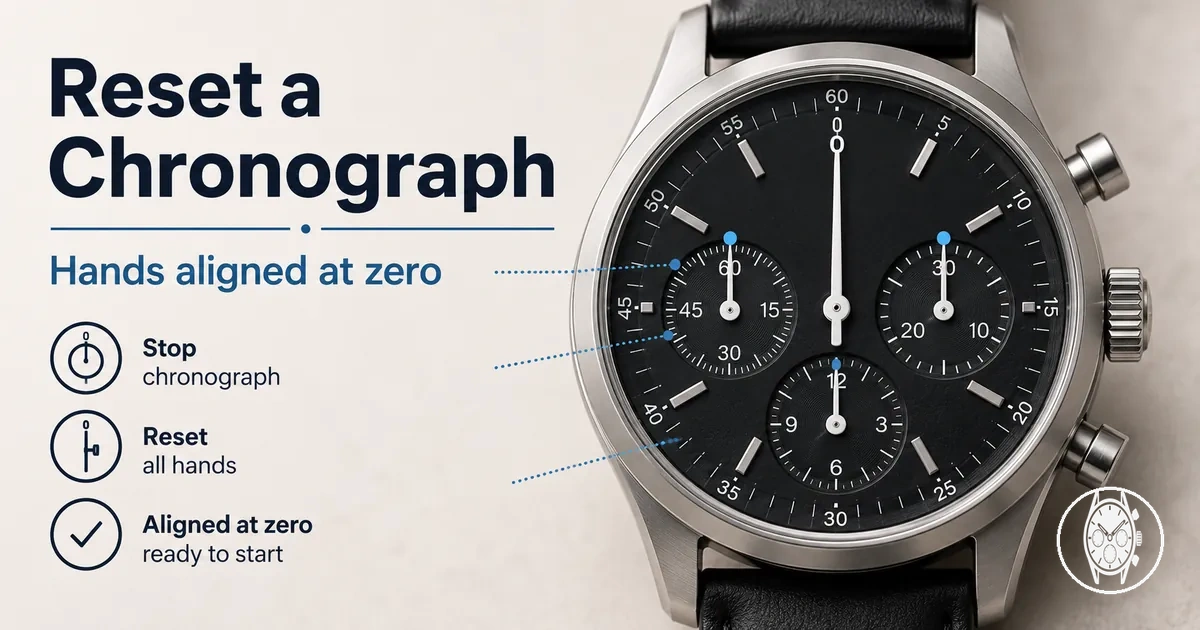
Reset a men's chronograph watches function by stopping the chronograph and using the model's specified reset pusher to return the chronograph hands and subdials to their zero position; if a hand remains off zero, use the model-specific recalibration procedure instead of repeating a normal reset. Citizen's Movement 0510 instruction manual, for example, assigns the upper-right pusher to start and stop the chronograph and the lower-right pusher to reset it after it has stopped.
These model-specific differences mean the instruction manual for the watch or movement should determine the required crown position, pushers and calibration mode.
A chronograph reset returns the elapsed-time display to zero, while recalibration changes hand alignment when a chronograph hand does not return to its intended zero position. Citizen's Movement H50 instructions specify a calibration target of 0 seconds and adjustment of the chronograph second hand in 1-second increments; Citizen's Movement B620 instructions use a different reset sequence, requiring the crown to be pulled out two steps and the upper-right pusher to be held for 2 seconds before zero-position correction. These model-specific differences mean the instruction manual for the watch or movement should determine the required crown position, pushers and calibration mode.
A battery change or strong impact can also create a zero-position problem in a quartz chronograph.
A battery change or strong impact can also create a zero-position problem in a quartz chronograph. Citizen's Movement 0520 instruction manual directs the user to perform zero-positioning after battery replacement when the chronograph second hand does not return to 0 seconds, while Citizen's Movement 0580 documentation identifies battery replacement or a strong shock as conditions that can leave chronograph hands away from the 0-second position. Resetting or recalibrating chronograph hands addresses display alignment; a pusher that does not operate, abnormal movement behaviour or another internal fault is a broader chronograph watch problem and should be handled according to the model's troubleshooting instructions or by a qualified watch service provider.
This separates a normal chronograph reset from recalibration and establishes what the adjustment is intended to change before you act.
Before attempting a model-specific reset sequence, identify which chronograph hands or subdials are misaligned, check their zero position, and confirm the crown and pusher functions in the instruction manual. This separates a normal chronograph reset from recalibration and establishes what the adjustment is intended to change before you act.
Table of Contents
What a Chronograph Reset Does
A chronograph reset returns the chronograph hands used for elapsed-time measurement to their zero position after timing has stopped; it does not service the watch movement. SJX Watches explains that a mechanical chronograph reset mechanism returns the hour, minute and seconds indications to zero and keeps them there until the chronograph is started again.
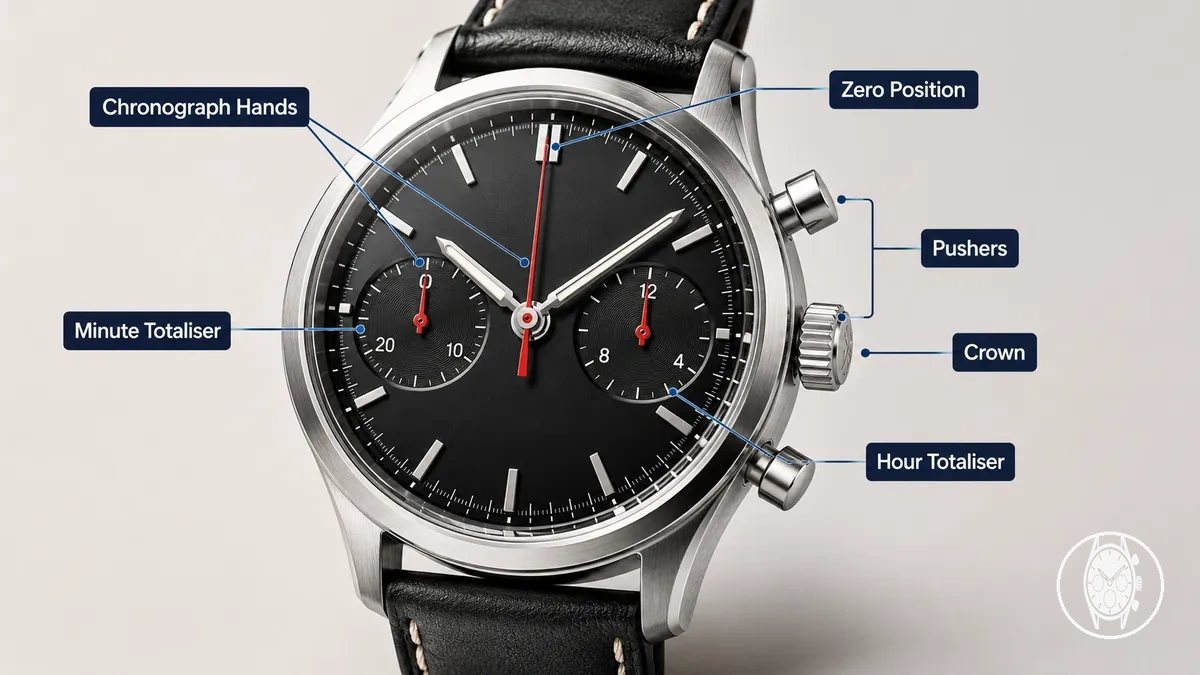
The central seconds hand returns to its 0-second position, while an equipped minute totaliser and hour totaliser return to their respective zero positions on the subdials. Shinola specifies that its chronographs use two pushers for basic chronograph control: Pusher A starts and stops elapsed-time measurement, while Pusher B resets the stopped chronograph; Shinola also identifies seconds and minutes as recorded units and states that certain sport models additionally record tenths of a second and hours. Because the displayed functions differ by model, identify the relevant chronograph buttons and subdials before deciding whether each elapsed-time indication has returned to its correct zero position.
The crown is relevant when the chronograph hands remain away from zero and the specific movement uses a crown-controlled adjustment mode for hand realignment.
The crown is relevant when the chronograph hands remain away from zero and the specific movement uses a crown-controlled adjustment mode for hand realignment. A normal chronograph reset changes the positions of the elapsed-time hands rather than servicing the movement, so a hand that remains off its specified zero position after a reset is the practical diagnostic cue for checking whether model-specific recalibration is needed.
When Chronograph Hands Need Recalibration
Chronograph hands need recalibration when a normal reset leaves an elapsed-time hand not at zero, such as the chronograph seconds hand remaining away from its 12 o'clock marker or the minute counter stopping off-index. Citizen's H50 support specifies 0 seconds and 0 minutes as the required chronograph reference positions and directs adjustment when the corresponding hands do not point to those values.
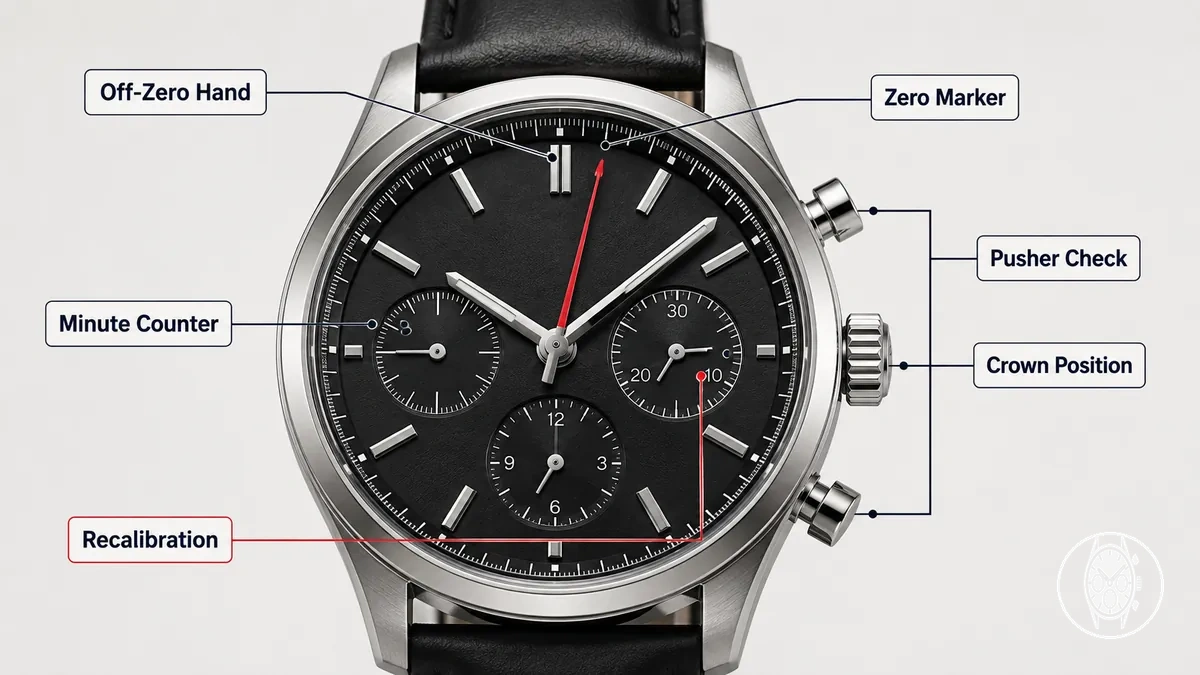
The main criterion is the position reached after a normal reset: returning to the specified zero position indicates a normal reset outcome, while remaining off-zero indicates misalignment that requires the movement's reference-position procedure. Seiko specifies 0 seconds and 0 minutes as the preliminary positions for its V172, V174 and V175 stopwatch hands and 00 seconds, 0 seconds and 0 minutes for the V176; Seiko also states that hands stopping elsewhere after reset require preliminary-position adjustment. Pusher response is a separate diagnostic signal, because Seiko's troubleshooting guidance identifies low power as one condition in which its V17-series buttons do not operate, so an unresponsive pusher alone does not establish hand misalignment.
- Seconds hand not at 12 o'clock: If the chronograph seconds hand remains away from its 0-second reference after reset, the likely condition is an off-zero reference position; check the movement's recalibration procedure before changing the hand position. Citizen's H50 instructions set the target to 0 seconds and move the chronograph seconds hand in 1-second increments during adjustment.
- Minute counter off-index: If the minute counter remains away from 0 minutes after reset, treat the symptom as counter misalignment when the model defines 0 minutes as its reference. Citizen's H50 support specifies 0 minutes for the chronograph minute hand and directs repeated presses of the lower-right button to return that hand to its reference position.
- Battery change followed by reset failure: On a quartz chronograph, an off-zero display after a battery change can require reference-position correction rather than another ordinary reset; the required sequence is movement-specific. Check the manufacturer's instructions for the installed movement before recalibration rather than transferring a button sequence from another calibre.
- Reset operates but a hand remains off-zero: Successful pusher operation combined with a chronograph hand that remains misaligned points to a reference-position issue rather than proving an internal fault. Citizen's B620 instructions, for example, correct the chronograph seconds hand to 0 seconds with the crown pulled out 2 steps after the upper-right button is held for 2 seconds.
- Pusher response changes: If a pusher no longer produces its documented response, first verify the required crown position and power state instead of assuming recalibration is the solution. Citizen's B620 instructions require the crown to be fully pushed in for normal chronograph operation, while Seiko's V17-series troubleshooting states that low power can prevent button operation; persistent abnormal response belongs to broader chronograph watch problems.
Recalibration controls differ among quartz chronograph movements even when the symptom is the same. For example, Citizen's B620 uses a crown position 2 steps out and a 2-second button hold before setting its chronograph seconds hand to 0 seconds, while Citizen's H50 uses crown position 2 and a button hold of 3 seconds or more before adjustment; confirm the movement number, crown position and pusher functions before preparing to recalibrate.
Before Resetting the Chronograph Hands
Before resetting the chronograph hands, identify the movement type, confirm the required crown position and pushers in the instruction manual, and verify that the watch has the power condition required for its reset procedure. Citizen's Movement 0510 instructions, for example, specify the crown in its normal position for an ordinary chronograph reset but the crown pulled out 2 steps for chronograph hand zero-position adjustment, so the safe action is to match the control state to the intended procedure before pressing a pusher.
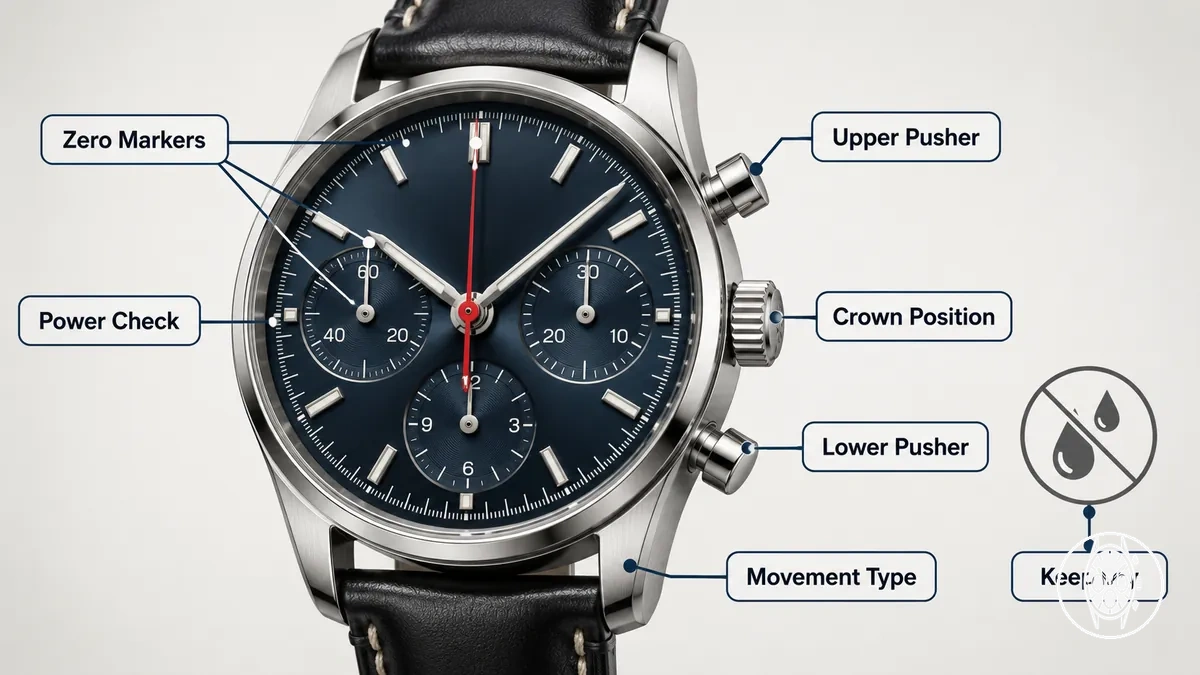
Preparation helps prevent a normal reset from being confused with a model-specific adjustment mode. Citizen's Movement 0510 instructions assign start/stop to the upper-right button and reset to the lower-right button, while Citizen's B620 zero-position procedure requires the crown pulled out 2 steps and the upper-right button held for 2 seconds before the chronograph seconds hand is adjusted to 0 seconds; these documented differences make the movement-specific instruction manual the appropriate reference for crown position and pusher sequence. Battery status also changes the expected response on powered chronographs: Citizen's B620 instructions identify a 2-second-interval seconds-hand movement as the insufficient-charge warning and state that chronograph operation stops in that condition.
- Crown position: If the crown position is known, use only the position specified for the intended reset or recalibration mode; the risk of using another position is selecting a different adjustment function. Citizen's Movement 0510 instructions distinguish the normal crown position for an ordinary reset from a crown position 2 steps out for zero-position adjustment, so verify the documented position first.
- Pusher identification: If the upper and lower pushers have not been identified, confirm their functions before using a sequence; assuming that button positions are universal can select the wrong operation. Citizen's Movement 0510 instructions identify the upper-right button as start/stop and the lower-right button as reset, providing a model-specific control check rather than a universal button rule.
- Battery status: If a quartz or solar quartz chronograph shows its documented low-power condition, address that condition before interpreting an abnormal reset response as hand misalignment. Citizen's B620 instructions specify a 2-second-interval seconds-hand movement as an insufficient-charge warning and state that chronograph operation stops during that condition, so restore the documented operating power state before evaluating reset response.
- Movement type: If the movement type is unknown, identify whether the watch uses a quartz, solar quartz or mechanical chronograph movement before applying a reset sequence; the risk is transferring controls or power checks between different movement systems. For example, Seiko's 8R46 and 8R48 mechanical chronograph instructions specify that stopwatch operation should not begin when the power-reserve indicator shows less than 10 hours, while Citizen's B620 uses an insufficient-charge warning for its solar-powered quartz movement.
- Instruction manual: If the movement or calibre-specific instruction manual is unavailable, locate the correct documentation before attempting a model-specific recalibration sequence. Citizen's B620 instructions require a crown position 2 steps out, a 2-second hold of the upper-right button and a 0-second target for its chronograph seconds hand; those values apply to that movement and should not be treated as a universal reset sequence.
- Water resistance: If the watch or controls are wet, follow the manufacturer's operating restriction rather than relying only on the stated water-resistance rating. Citizen's H500 instructions state that the crown and buttons should not be operated when the watch is wet because water can enter the watch, and the same documentation lists water-resistance categories including 3, 5 and 10/20 atmospheres with different permitted exposure conditions.
- Stuck or unclear controls: If a pusher is stuck or the crown position cannot be identified confidently, stop the sequence and verify the model-specific control arrangement before pressing buttons repeatedly. Seiko's 8R46 and 8R48 instructions document both normal and screw-lock crown configurations and caution against screwing the crown in with excessive force because the crown slots can be damaged, so an unclear control state warrants checking the instruction manual or qualified watch-service guidance before continuing.
The final pre-check is therefore to match the movement number to its instruction manual, verify crown position and pusher functions, confirm the required battery or power state, and observe the manufacturer's water-resistance operating cautions. If the controls remain unclear or a pusher does not respond as documented, check the model-specific instructions or seek qualified watch-service guidance before pressing the controls repeatedly.
Check the Crown Position
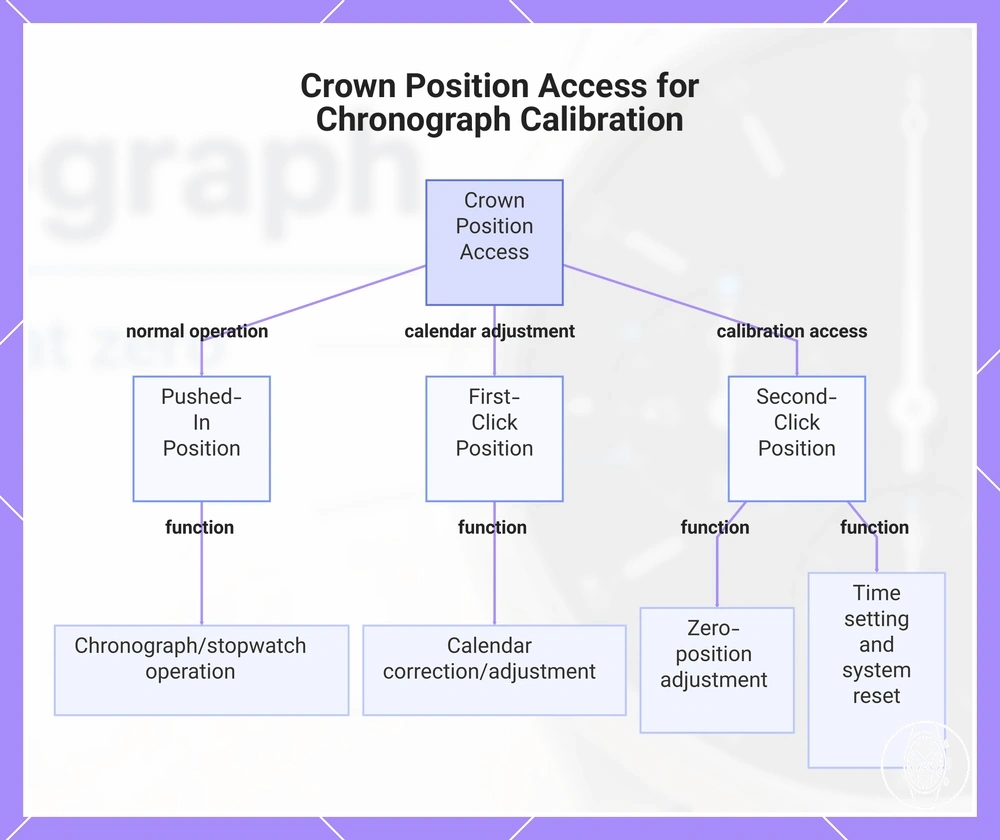
The crown position controls access to the chronograph's normal operating state or an adjustment mode, so pushed-in, first-click and second-click positions must not be treated as interchangeable. Citizen's Movement 0510 instructions specify the pushed-in position for normal chronograph operation and a crown pulled out 2 steps for chronograph zero-position adjustment; on that movement, using the second-click position therefore changes access from normal operation to calibration-related adjustment.
The function assigned to first-click or second-click is movement-specific rather than universal.
The function assigned to first-click or second-click is movement-specific rather than universal. Citizen's B620 instructions assign first-click to calendar correction and second-click to time and chronograph reference-position adjustment, while Seiko's V192 instructions use the pushed-in position for stopwatch operation, first-click for calendar adjustment, and second-click for time setting, stopwatch-hand preliminary-position adjustment and system reset; check the manual for the installed movement when the required calibration mode is uncertain, and keep the crown-position check limited to identifying the position that provides reset or calibration access.
This chart shows the three crown positions and their movement-specific functions for accessing chronograph calibration or adjustment modes.
This chart shows the three crown positions and their movement-specific functions for accessing chronograph calibration or adjustment modes.
Identify the Start, Stop, and Reset Pushers
Before recalibration, identify the upper pusher, lower pusher, and reset pusher by the pusher response documented for the watch movement rather than by position alone. Citizen's B620 instructions specify that the upper pusher controls start and stop during normal chronograph use, while the lower pusher resets the stopped chronograph to its zero position.
- Upper pusher: On Citizen B620, one press starts the chronograph and the next press stops it, so the expected response in normal operation is a start-stop change rather than a reset.
- Lower reset pusher: On Citizen B620, pressing the lower pusher while the chronograph is stopped performs the reset and returns the elapsed-time indication toward zero. Seiko's 8R46 and 8R48 instructions similarly identify Button B as the stopwatch reset control.
- Long press in calibration mode: A long press can perform an adjustment function instead of normal stopwatch control. Citizen's B620 instructions require the upper pusher to be held for 2 seconds with the crown pulled out 2 steps before chronograph-second-hand adjustment becomes available.
- Repeated press in calibration mode: A repeated press can advance a chronograph hand through its adjustment positions rather than start or stop timing. Citizen's B620 instructions use repeated presses of the upper pusher to move the chronograph seconds hand toward 0 seconds, while Seiko's V172, V174 and V175 procedures use repeated presses of Button B during stopwatch-hand adjustment.
The same physical pusher can therefore produce a different response in normal stopwatch use and calibration mode, so confirm the movement-specific sequence before using a long press or repeated press. Keep broader guidance on using and setting a chronograph separate from this local pusher-identification check.
How to Recalibrate Chronograph Hands to Zero
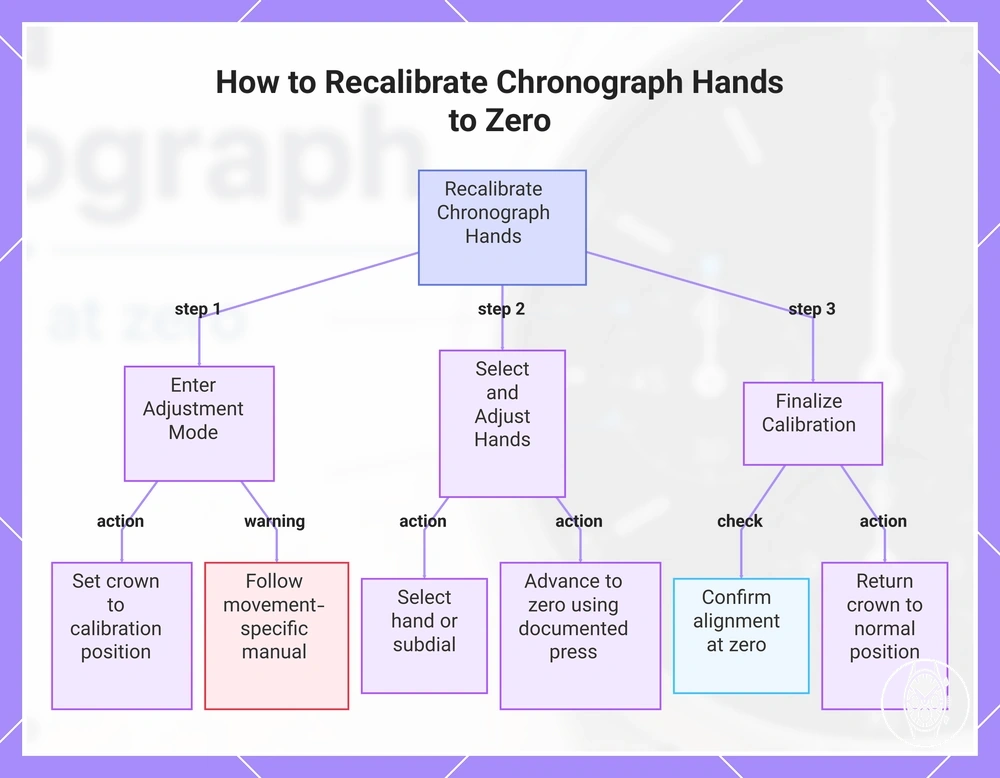
To recalibrate chronograph hands to the zero position, enter the watch movement's documented adjustment mode, select the affected chronograph hand or subdial, move it to its specified zero reference, confirm the alignment, and return the crown to normal position. The required crown position and pusher sequence are movement-specific, so the instruction manual for the installed movement determines the correct calibration sequence.
Manufacturer documentation shows why the sequence must remain model-qualified.
Manufacturer documentation shows why the sequence must remain model-qualified. Citizen's H50 instructions use crown position 2 and a hold of 3 seconds or more to make the chronograph seconds hand adjustable, whereas Citizen's B620 instructions use the crown pulled out 2 steps and a 2-second hold before adjustment; both procedures use 0 seconds as the chronograph seconds-hand reference.
- Enter adjustment mode: Set the crown to the calibration position specified by the movement manual and operate the designated pusher for the documented press or hold interval. The visible result to confirm is that the relevant chronograph hand becomes selectable or begins responding to adjustment inputs rather than normal stopwatch commands.
- Select the hand or subdial: Use the specified pusher to select the chronograph seconds hand, minute totaliser, hour totaliser, or other adjustable subdial when the movement provides separate selection. Confirm selection by checking which indicator responds before advancing it.
- Advance the selected hand to zero: Press the designated pusher until the selected chronograph hand aligns with its documented zero position. For example, Citizen's H50 instructions specify movement in 1-second increments for individual presses of the chronograph-seconds adjustment pusher, with 0 seconds as the target.
- Use repeated press or long press only as documented: A repeated press can provide incremental movement, while a long press can produce continuous or faster movement on certain quartz chronograph movements. Citizen's H50 documentation specifies 1-second movement per individual press and continuous movement while the same pusher is held, so stop the adjustment when the hand reaches the zero marker.
- Align any remaining subdial: Select each remaining adjustable counter and move it to its own documented zero reference before completing recalibration. Citizen's H50 instructions, for example, specify 0 minutes as the reference value for the chronograph minute hand.
- Confirm the alignment: Check that every adjusted chronograph hand and subdial points to its specified zero position rather than merely appearing close to it. The visible result should match the zero references defined in the movement manual before the setting is finalised.
- Return the crown to normal position: Push or set the crown back to the movement's documented normal operating position to complete the calibration sequence. Confirm that the chronograph hands remain aligned at zero and that the watch has returned from adjustment mode to its normal operating state.
This chart outlines the step-by-step process to recalibrate chronograph hands to zero, emphasizing the need to follow movement-specific procedures.
Adjust the Central Chronograph Second Hand
Align the central chronograph second hand with its zero marker at 12 o'clock using the movement's specified pusher press. Citizen's H50 instructions set the target at 0 seconds and specify 1-second increments per upper-right pusher press; if the watch has a separate running seconds hand, do not confuse it with the chronograph hand.
- Check the hand: Identify the central chronograph second hand; its target is the 12 o'clock zero marker.
- Advance the hand: On Citizen H50, each upper-right pusher press advances it 1 second toward zero.
- Confirm alignment: Stop when the hand points to 0 seconds; the visible outcome is alignment at 12 o'clock.
Adjust the Minute and Hour Totalisers
After aligning the central chronograph second hand, adjust each supported minute totaliser and hour totaliser to the zero position specified for its subdial, then confirm that each counter sits directly on its zero marker. Use the movement's documented pusher cycling to select and advance the required counter rather than assuming that every chronograph adjusts its totalisers in the same sequence.
Counter layout and adjustment access are movement-specific, so identify the relevant chronograph buttons and subdials before changing a reference position.
Counter layout and adjustment access are movement-specific, so identify the relevant chronograph buttons and subdials before changing a reference position. Citizen's H50 instructions specify 0 minutes for the chronograph minute hand, while Citizen's U822 reference-position procedure specifies 0 hours for its chronograph hour hand; these are model-specific zero values, not universal instructions for every chronograph.
- Minute totaliser: Select the minute counter when the movement provides separate selection, advance it to its documented subdial marker, and confirm the visible alignment at zero. On Citizen H50, the specified reference is 0 minutes, so the minute totaliser is correctly aligned when its hand points to the 0-minute marker.
- Hour totaliser: Select the hour counter when it is independently adjustable, advance it to its documented zero position, and confirm that the hand rests on the corresponding subdial marker. On Citizen U822, the specified chronograph-hour reference is 0 hours, so confirmation requires the hour totaliser to point to the 0-hour position.
- Pusher cycling: If the watch adjusts only one counter at a time, use the movement's documented pusher cycling to select the required subdial before advancing it. Confirm selection by observing that the intended counter, rather than another chronograph hand, responds to the adjustment input.
- Final alignment: Confirm each adjusted counter independently against its own zero marker before leaving adjustment mode. The minute totaliser should remain at its specified minute-zero reference and the hour totaliser at its specified hour-zero reference; if either counter remains off its documented marker, its alignment is not yet complete.
Resetting a Chronograph After a Battery Change
After a battery change, a quartz chronograph needs recalibration when its chronograph hands no longer return to their specified zero position; an ordinary stopwatch reset is sufficient only when the hands return correctly. Citizen's Movement 0520 instructions specifically direct zero-positioning after battery replacement when the chronograph second hand does not return to 0 seconds.
Citizen's Movement 0520 instructions specifically direct zero-positioning after battery replacement when the chronograph second hand does not return to 0 seconds.
Battery replacement can leave the movement's stored or reference hand positions requiring correction, which appears as hand misalignment rather than a normal reset failure. Citizen's Movement 0580 instructions state that the chronograph second hand and 1/20-second hand can remain away from the 0-second position after battery replacement and provide a zero-position correction procedure. The required reset mode, crown position and pusher response are movement-specific, so use the instruction manual for the installed quartz movement rather than applying another calibre's sequence.
- Battery change → normal zero return: Run the ordinary reset and observe the hands. If every elapsed-time hand reaches its documented zero position, recalibration is not indicated by the post-replacement test.
- Battery change → hand misalignment: If a chronograph hand remains off-zero, use the movement's recalibration procedure. Citizen 0520 specifies 0 seconds as the reference for its chronograph second hand after battery replacement.
- Reset mode → crown position: Set the crown only to the position specified by the movement manual before entering reset mode. Citizen 0520 uses its time-correction crown position for chronograph zero-position adjustment, while other movements can assign calibration access differently.
- Pusher response → verify adjustment: Use the documented pusher and confirm that the intended chronograph hand moves. Citizen 0520 specifies Button B for moving its chronograph second hand to 0 seconds and states that holding the button advances the hand rapidly.
- Post-replacement test → confirm zero: Complete the movement's verification step and check that the adjusted hands return to zero. Citizen 0520 instructs pressing Button A after zero-positioning to confirm that the chronograph hands return correctly.
If a chronograph hand still cannot reach its documented zero position, the pusher response remains abnormal, or the quartz chronograph continues to behave irregularly after the prescribed post-replacement test, the fault extends beyond routine recalibration. Use the movement's broader troubleshooting guidance or professional inspection rather than repeating the reset sequence, and refer to chronograph watch problems for the next diagnostic boundary.
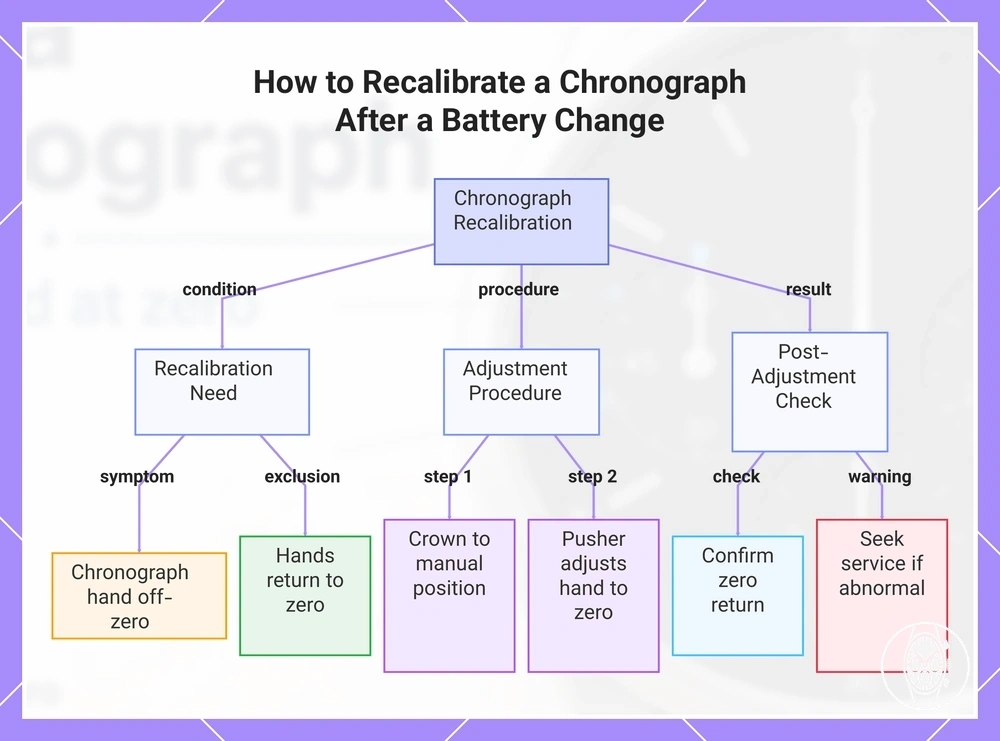
This chart shows when recalibration is needed, the key steps to adjust chronograph hands, and what to do if the problem persists after a battery change.
This chart shows when recalibration is needed, the key steps to adjust chronograph hands, and what to do if the problem persists after a battery change.
Test the Chronograph After Resetting
Test the chronograph after resetting by checking start, stop, reset, return to zero, subdial return, and pusher response before normal use resumes. The verification passes when each documented control produces its expected visible response; a single failed check is a signal to repeat once, not proof of a mechanical fault.
Test the chronograph after resetting by checking start, stop, reset, return to zero, subdial return, and pusher response before normal use resumes.
Citizen's H50 movement instructions provide a model-specific example: its chronograph second hand should return to 0 seconds and its chronograph minute hand to 0 minutes after reset. The same instructions assign the upper-right button to chronograph start and stop, so these values and controls apply to H50 rather than to every chronograph movement.
- Start: Press the movement's documented start pusher. Pass if the chronograph begins measuring elapsed time; if it does not start, repeat the check once with the controls in the documented starting state.
- Stop: Press the documented stop pusher while the chronograph is running. Pass if elapsed-time measurement stops; if it continues, repeat once before treating the pusher response as a fault signal.
- Reset and hand return: With the chronograph stopped, press its documented reset control. Pass if the elapsed-time hands return to their specified zero positions; for Citizen H50, the documented chronograph-second-hand value is 0 seconds.
- Subdial return: Inspect each elapsed-time subdial after reset. Pass if each totaliser returns to its movement-specific reference position; Citizen H50 specifies 0 minutes for its chronograph minute hand, while another movement must be checked against its own documented value.
- Pusher response: Operate the start, stop, and reset controls only in the states specified by the movement instructions. Pass if each input produces its assigned response; an absent or unexpected response should be confirmed with one careful retest rather than treated immediately as a diagnosis.
If one test fails, place the chronograph back in the required operating state and repeat that check once carefully. If the same return position, subdial return, or pusher response fails again, stop the verification and consult the movement-specific troubleshooting instructions rather than assuming the reset succeeded or repeatedly recalibrating the watch.
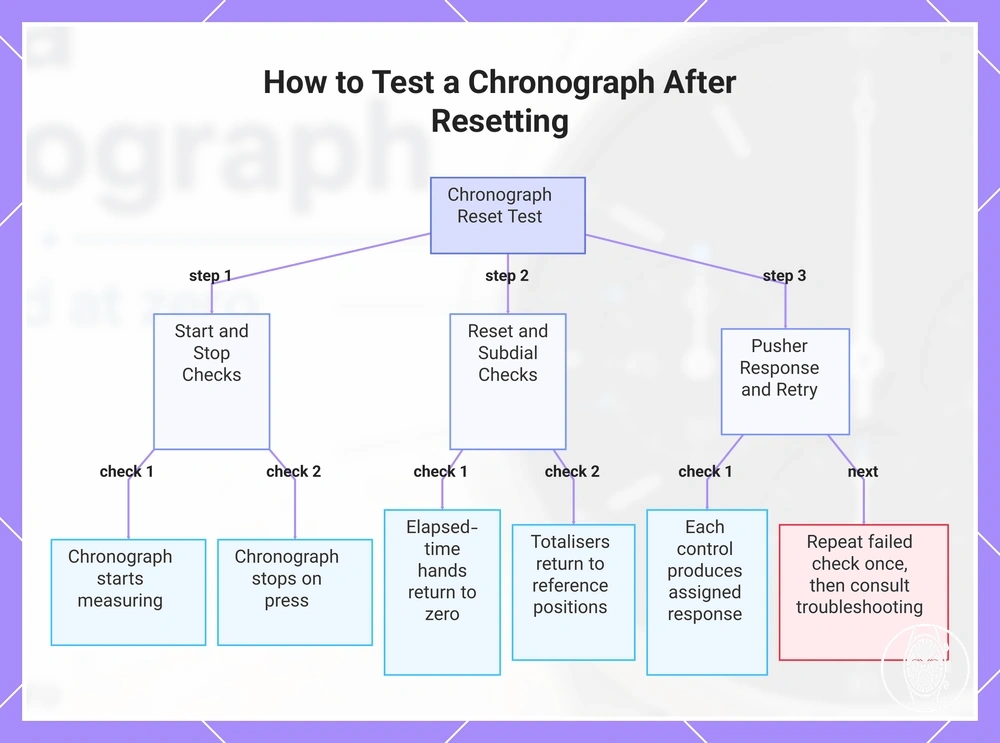
If one test fails, place the chronograph back in the required operating state and repeat that check once carefully.
This chart shows the verification steps for testing a chronograph after reset, including start, stop, reset, subdial return, and pusher response checks, with a retry protocol.
Why a Chronograph Still Will Not Reset Correctly
If a chronograph still will not reset correctly after normal recalibration, separate the symptom from the likely cause before attempting another reset. A wrong crown position, unresponsive pusher, low battery or charge state, hand misalignment, movement fault, water damage, or impact damage can produce different reset-failure patterns, and none of these symptoms alone confirms internal damage.
Use the movement manual to verify crown position, power state, pusher response, and zero-reference positions before escalating.
Use the movement manual to verify crown position, power state, pusher response, and zero-reference positions before escalating. Citizen's B620 instructions require the crown fully pushed in for normal chronograph operation and state that the chronograph cannot operate during its insufficient-charge warning, while Citizen's H50 instructions note that a strong shock can leave the chronograph minute hand away from its zero reference; repeated failure under the correct operating conditions is therefore a stronger repair signal than a single failed reset.
| Symptom | Likely cause | Check | Next safe action |
|---|---|---|---|
| The chronograph will not reset and its controls behave differently from normal operation. | Wrong crown position or wrong operating mode. | Compare the crown position with the movement manual. Citizen B620 specifies the fully pushed-in position for normal chronograph operation. | Return the crown to the documented operating position and make one careful reset attempt. |
| The reset control produces no documented pusher response. | Incorrect operating state, insufficient power, or an unresponsive pusher. | Verify the required crown position and power state before treating the pusher as faulty. | If the pusher remains unresponsive after one correct retest, stop repeated pressing and move to broader troubleshooting. |
| A quartz chronograph will not operate or reset while showing its low-power indication. | Low battery or insufficient charge. | Check the movement's power warning. Citizen B620 specifies 2-second-interval seconds-hand movement as its insufficient-charge indication and states that chronograph operation stops in that state. | Restore the watch to its documented operating power state before judging the reset result. |
| The chronograph operates, but a hand remains off-zero after reset. | Hand misalignment or an incorrect reference position. | Compare the affected hand with its documented zero reference. Seiko's V17-series instructions identify stopwatch hands stopping away from 0 seconds or 0 minutes as preliminary-position misalignment. | Repeat the model-specific recalibration once; if the same off-zero result remains, stop repeating the procedure. |
| Reset failure repeats with the correct crown position, adequate power, and completed hand alignment. | Possible movement fault beyond user-level recalibration. | Confirm that the same symptom occurs after one correctly performed reset with the documented controls. | Stop user-level reset attempts and use the movement's troubleshooting guidance or a qualified watch repairer. |
| Reset problems begin after visible moisture exposure or a significant knock. | Possible water damage or impact damage affecting hand position, controls, or the movement. | Check the timing of the event and symptom without treating the connection as a definitive diagnosis. Citizen H50 specifically states that a strong shock can move its chronograph minute hand away from zero. | Stop repeated operation when water damage or impact damage is suspected and move to professional inspection. |
Another reset attempt is reasonable when the failure traces to a correctable user-level condition such as crown position, power state, or documented hand misalignment and the controls still respond normally. Repeated failure with correct settings, an unresponsive pusher, suspected water or impact damage, or an unchanged off-zero result is the boundary for stopping reset attempts and moving to repair-focused chronograph watch problems.
Hands Return to the Wrong Zero Position
Chronograph hands have a wrong zero position when a repeated reset returns one or more hands to the same fixed point away from the specified zero marker; that consistent off-zero return indicates a reference-position adjustment need rather than proving an internal fault. Seiko's instructions for calibres V172, V174 and V175 specify 0 seconds for the stopwatch 1/5-second hand and 0 minutes for the stopwatch minute hand, and direct preliminary-position adjustment when these hands do not return to zero after reset.
- Central seconds hand: If the central seconds hand repeatedly returns to the same off-zero point, compare it with the movement's specified zero marker. For Seiko V172, V174 and V175, the stopwatch 1/5-second hand reference is 0 seconds; a consistent return elsewhere indicates that its preliminary position requires adjustment.
- Minute totaliser: If the minute totaliser repeatedly stops off-index at the same point, compare that wrong return point with its documented reference. Seiko specifies 0 minutes for the stopwatch minute hand on V172, V174, V175 and V176, so a consistent non-zero return identifies a preliminary-position adjustment need on those calibres.
- Hour totaliser: Compare an hour totaliser with the zero marker specified for that movement rather than transferring another calibre's seconds or minutes value. The reviewed Seiko V172, V174, V175 and V176 evidence does not provide an adjustable stopwatch hour-totaliser reference value, so the applicable movement manual must supply that value before an off-zero hour counter is classified for adjustment.
- Repeated reset: A chronograph hand that returns to the same wrong zero position after repeated reset shows a consistent misaligned-zero pattern. If the hand instead returns to different positions or moves unpredictably, that behavior does not match the fixed preliminary-position error described in Seiko's V17-series instructions, so repeated adjustment should not be treated as the confirmed next action.
Pushers Do Not Respond During Reset
If the pushers do not respond during reset or calibration behavior, first verify the locked crown or control state, the required operating mode, and the watch's power condition before treating the response failure as damage. A pusher that remains stuck or physically resistant after these checks is a stop signal rather than a reason to increase pressure.
- Locked crown or control state: Check whether the watch uses screw-lock pushers or another locking arrangement before testing the reset response. Seiko's V192 instructions specify that its screw-lock button cannot be pressed while locked and becomes operable after the button ring is unlocked, so a locked control should be returned only to its documented usable state before retesting.
- Wrong mode: Confirm the crown position and operating mode required for calibration behavior. Citizen's B620 instructions require the crown to be pulled out 2 steps and the upper-right pusher held for 2 seconds before chronograph-second-hand adjustment becomes available; no calibration response in another crown position does not by itself identify a pusher fault.
- Low battery or charge state: Check the quartz chronograph's documented power warning before interpreting no response as a reset failure. Citizen's B620 instructions identify 2-second-interval movement of the seconds hand as the insufficient-charge warning and state that chronograph operation stops in that condition, so restore the documented operating power state before retesting.
- Stuck pusher or water exposure: If a pusher does not move normally, or the watch is wet, stop operating the controls. Citizen's B620 instructions state that buttons should not be operated while the watch is wet because water can enter the case, while Seiko's V192 instructions likewise prohibit button operation when the watch is wet or underwater.
- Excessive-force risk: If an unresponsive pusher or locked control remains physically resistant after the documented state has been checked, stop the reset attempt. Seiko's V192 instructions warn that excessive turning of a screw-lock button ring can make it difficult to return to its original position, so increased pressure is not an appropriate response to persistent resistance.
If the pushers remain stuck, physically resistant, or non-responsive after the correct mode, power state, and control position have been verified, stop reset attempts and treat the condition as part of broader chronograph watch problems that may require inspection by a qualified repairer.
When the Manual or a Watch Repairer Is Needed
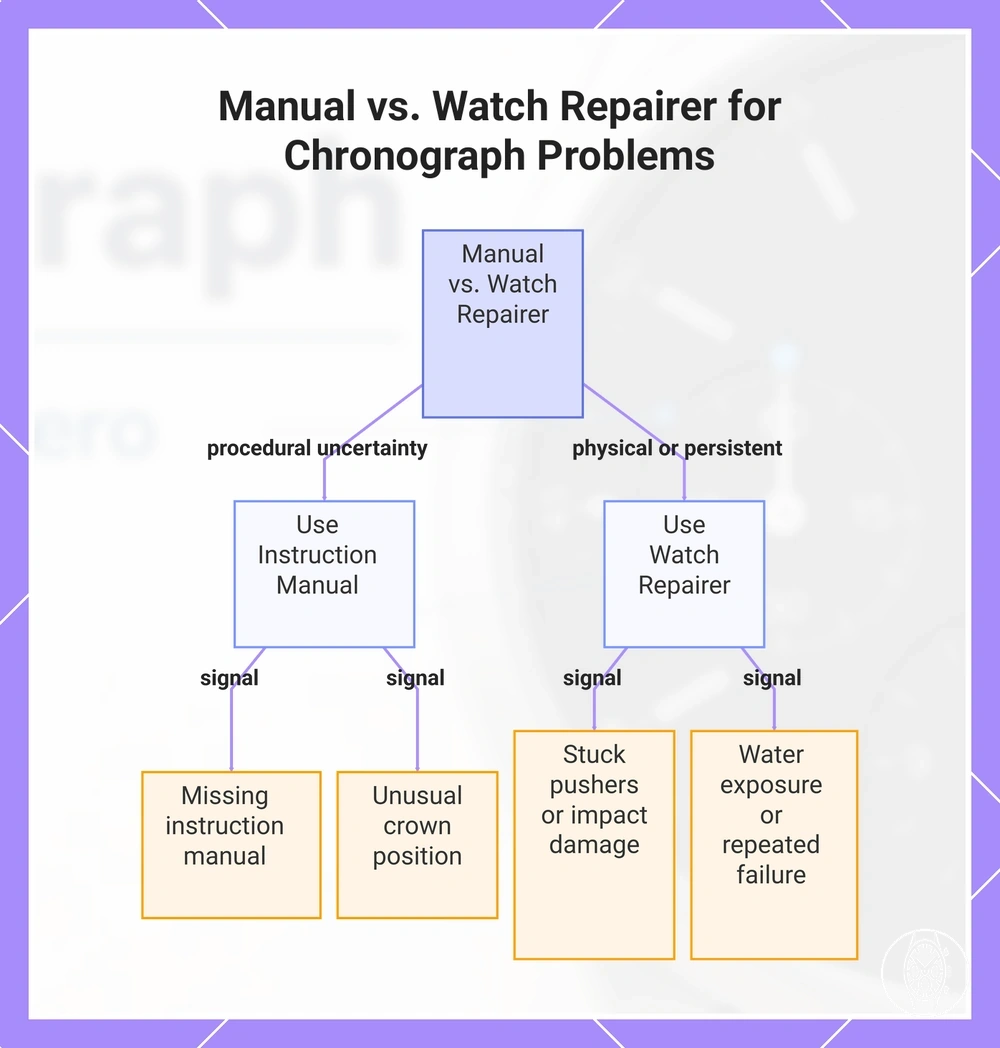
Use the chronograph's instruction manual when the problem is uncertainty about model-specific instructions, crown position, or pusher sequence; use a watch repairer when there is persistent functional failure, stuck pushers, water exposure, or impact damage. Further reset attempts are not the safe next step when controls remain physically resistant or the same failure persists after the documented procedure has been completed correctly.
The instruction manual should resolve sequence uncertainty because reset and calibration controls are movement-specific.
The instruction manual should resolve sequence uncertainty because reset and calibration controls are movement-specific. Citizen's B620 instructions, for example, require the crown pulled out 2 steps and the upper-right pusher held for 2 seconds before chronograph-hand adjustment, so another movement's sequence should not be substituted; broader guidance on using and setting a chronograph remains secondary to the installed movement's model-specific instructions. A watch repairer becomes the appropriate escalation when the problem is physical or remains repeatable after the correct sequence, crown position, and operating conditions have been verified.
- Missing instruction manual: The signal is uncertainty about crown position, pusher assignment, or reset sequence; the risk is applying controls intended for another movement. The safest next step is to identify the watch or movement and obtain its model-specific instructions before another reset attempt.
- Unusual crown positions: The signal is a reset or adjustment sequence requiring a crown state that is unclear or different from normal operation; the risk is entering the wrong mode. Citizen's B620 provides a model-specific numerical example: chronograph-hand adjustment requires the crown pulled out 2 steps, so verify the documented crown position before operating the pushers.
- Repeated failed reset: The signal is the same off-zero or non-responsive result after the documented reset and recalibration procedure has been completed correctly; the risk is treating persistent functional failure as sequence uncertainty. Stop repeating the procedure and move to professional inspection.
- Stuck pushers: The signal is a pusher that remains physically resistant or does not travel normally; the risk is worsening a physical control problem through continued operation. Stop using the pusher and have a watch repairer inspect the watch rather than continuing reset attempts.
- Post-battery-change failure: The signal is a quartz chronograph hand that remains off-zero after battery replacement and the movement's documented reference-position correction. Citizen's Movement 0520 instructions specify 0 seconds as the chronograph-second-hand reference after battery replacement; if the hand still cannot reach that position after the prescribed procedure, professional inspection is the safer next step.
- Water exposure: The signal is a wet watch or suspected moisture exposure during a reset problem; the risk is water entering through operated controls. Citizen's B620 instructions state that buttons should not be operated while the watch is wet, so stop operating the pushers and move to professional inspection when moisture exposure is suspected.
- Impact damage: The signal is reset or alignment trouble that begins after a significant knock; the risk is a physical hand-position or movement problem rather than an incorrect sequence. Citizen's H50 instructions state that a strong shock can move its chronograph minute hand away from its zero reference, so persistent post-impact misalignment warrants inspection instead of repeated recalibration.
A missing or unclear sequence is primarily an instruction-manual problem, while a stuck control, suspected physical damage, water exposure, or persistent failure after the correct sequence is a watch-repairer problem. Across men's chronograph watches, the safe next step is to use the manual for procedural uncertainty and stop further reset attempts when the failure is physical or remains repeatable.
Across men's chronograph watches , the safe next step is to use the manual for procedural uncertainty and stop further reset attempts when the failure is physical or remains repeatable.
This chart shows the two main categories of chronograph problems and the appropriate escalation: use the instruction manual for procedural uncertainty, and a watch repairer for physical or persistent failure.